Your BMW 5-series & M5 E60/E61 is supported

147 features available

Change Selection

BMW 5-series & M5

E60/E61

Your BMW 5-series & M5 E60/E61 is supported

147 features available

Change Selection
Available features for your car
Search features
Search features

Customize

Unlock manufacturer-hidden features to boost security, upgrade your infotainment system, and personalize your drive.
101
Les plus populaires 10
Châssis et Moteur 9
Lumières: Automatique 4
Lumières: À Venir/Partir de la maison 14
Lumières: Feux Diurnes (DRL) 4
Lumières: Extérieur 10
Lumières: Intérieur 1
Verrouillage: Automatique 14
Verrouillage: Bip et Clignotement 12
Verrouillage: Portes et Alarme 9
Miroirs 1
Fenêtres et Toit ouvrant 10
Autre 3

Diagnose

Diagnose dashboard warning lights for ABS, SRS, Engine, Transmission, TPMS, HVAC, and more, and clear fault codes instantly.
31
OBD2 basique
Chauffage et climatisation
Antipatinage/contrôle de stabilité
Airbags
Moteur
Transmission
Colonne de direction
Combiné d’instruments
Système d’accès au véhicule (CAS)
Alarme
Capteurs d’alarme
Capteurs d’aide au stationnement
Écran du système d’infodivertissement
Module central (dans l’espace jambes du conducteur) (FRM)
Boîtier de connexion (passager) (JBBF)
Démarrage sans clé
Toit ouvrant
Capteur de pluie/luminosité
Écran du système d’infodivertissement
Système d’infodivertissement
Changeur de CD
Passerelle réseau CAN
Écran du système d’infodivertissement
Téléphone
Système audio
Tuner
Commutateur d’éclairage
Assistant de feux de route adaptatifs
Commutateurs sur console centrale
Système de régulation de vitesse adaptatif
Pompe à carburant

Live Data

Stay informed with real-time data across the vehicle, including engine RPM, speed, fuel trims, oxygen (O2) sensor data, coolant/oil temperature, and more.
9
Données en direct sur la vitesse de rotation de roue
Infos sur la batterie de la voiture
Données en direct sur le turbo moteur
Données CVC en direct
Données du moteur
Informations sur le filtre à particules diesel
Aide au stationnement (PDC)
Informations sur le kilométrage du véhicule
Données en direct de l'OBD2 basique

Service

Manage service intervals, service/oil reset, TPMS reset, EPB reset, battery registration, DPF regeneration, and other service options on your own.
6
Régénération du filtre à particules diesel (FAP)
Réinitialisation de l’indicateur de maintenance
Enregistrement de la batterie
Infos ECU détaillées
Tests d’émissions
Test d'accélération

All available features

Customize

Unlock manufacturer-hidden features to boost security, upgrade your infotainment system, and personalize your drive.
101 features
Les plus populaires 10
Châssis et Moteur 9
Lumières: Automatique 4
Lumières: À Venir/Partir de la maison 14
Lumières: Feux Diurnes (DRL) 4
Lumières: Extérieur 10
Lumières: Intérieur 1
Verrouillage: Automatique 14
Verrouillage: Bip et Clignotement 12
Verrouillage: Portes et Alarme 9
Miroirs 1
Fenêtres et Toit ouvrant 10
Autre 3
OBD2 basique
Chauffage et climatisation
Antipatinage/contrôle de stabilité
Airbags
Moteur
Transmission
Colonne de direction
Combiné d’instruments
Système d’accès au véhicule (CAS)
Alarme
Capteurs d’alarme
Capteurs d’aide au stationnement
Écran du système d’infodivertissement
Module central (dans l’espace jambes du conducteur) (FRM)
Boîtier de connexion (passager) (JBBF)
Démarrage sans clé
Toit ouvrant
Capteur de pluie/luminosité
Écran du système d’infodivertissement
Système d’infodivertissement
Changeur de CD
Passerelle réseau CAN
Écran du système d’infodivertissement
Téléphone
Système audio
Tuner
Commutateur d’éclairage
Assistant de feux de route adaptatifs
Commutateurs sur console centrale
Système de régulation de vitesse adaptatif
Pompe à carburant
Données en direct sur la vitesse de rotation de roue
Infos sur la batterie de la voiture
Données en direct sur le turbo moteur
Données CVC en direct
Données du moteur
Informations sur le filtre à particules diesel
Aide au stationnement (PDC)
Informations sur le kilométrage du véhicule
Données en direct de l'OBD2 basique
Régénération du filtre à particules diesel (FAP)
Réinitialisation de l’indicateur de maintenance
Enregistrement de la batterie
Infos ECU détaillées
Tests d’émissions
Test d'accélération

Not sure a feature will work on your specific BMW 5-series & M5? Try Carista risk-free with our 30-day money-back guarantee.

BMW 5-series & M5 (E60/E61)

147+ features

Ready to take control of your BMW 5-series & M5?

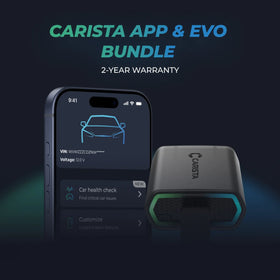
BestsellerCarista Bundle: EVO + 12-Month PRO

Carista Bundle: EVO + 12-Month PRO

Scanner $50.00 + $4.99/month for the app

Ready to take control of your BMW 5-series & M5?

BestsellerCarista Bundle: EVO + 12-Month PRO

Carista Bundle: EVO + 12-Month PRO

Scanner $50.00 + $4.99/month for the app

Frequently Asked Questions

Is using the Carista app and scanner safe, and how is my vehicle data protected?
Yes, using the Carista App and Scanners is safe.

Our company, certified with TISAX, achieved TISAX level 2 certification in January 2024, ensuring the highest information security standards. Trusted Information Security Assessment Exchange (TISAX) is a collection of information security policies we adhere to. We strictly follow them, utilizing advanced encryption and security protocols to protect your vehicle data, ensuring it remains confidential and secure at all times.

By implementing security measures, Carista ensures that using our App and Scanners is not only convenient for vehicle customizations and diagnostics but also safe and secure for your personal data.TEst
Does the Carista scanner include a warranty?
Yes, each Carista Scanner includes a 2-year warranty.

If you suspect the Scanner is faulty, double-check that it's securely plugged in, your car's ignition is on, and it's connected to the Carista App via Bluetooth. If the problem remains, find the gear icon at the bottom right of your Carista App screen and select "Report a problem." Our experts will help you troubleshoot or guide you through replacing the faulty scanner.
Does installing a Carista EVO scanner void my car's warranty?
Using an OBD-II (On-Board Diagnostics) scanner to monitor your vehicle's performance, diagnose issues, or gather data should not void your car's warranty. The OBD2 port is a standardized diagnostic interface that allows external devices to read information from the vehicle's computer system.

Our OBD Scanners are of high quality and are designed to work seamlessly with your vehicle’s computer system.

However, checking your vehicle’s warranty terms and conditions is important to see if using a particular OBD2 device or modification would impact your warranty coverage.
How do I connect the Carista EVO scanner?
Just plug the scanner into your car and start using the app. There’s no prior setup, pairing, or connecting necessary. Just make sure your phone/tablet’s Bluetooth is turned on. When the Carista app asks you what kind of scanner you’re using select Carista.
See all FAQs

Frequently Asked Questions

Is using the Carista app and scanner safe, and how is my vehicle data protected?
Yes, using the Carista App and Scanners is safe.

Our company, certified with TISAX, achieved TISAX level 2 certification in January 2024, ensuring the highest information security standards. Trusted Information Security Assessment Exchange (TISAX) is a collection of information security policies we adhere to. We strictly follow them, utilizing advanced encryption and security protocols to protect your vehicle data, ensuring it remains confidential and secure at all times.

By implementing security measures, Carista ensures that using our App and Scanners is not only convenient for vehicle customizations and diagnostics but also safe and secure for your personal data.TEst
Does the Carista scanner include a warranty?
Yes, each Carista Scanner includes a 2-year warranty.

If you suspect the Scanner is faulty, double-check that it's securely plugged in, your car's ignition is on, and it's connected to the Carista App via Bluetooth. If the problem remains, find the gear icon at the bottom right of your Carista App screen and select "Report a problem." Our experts will help you troubleshoot or guide you through replacing the faulty scanner.
Does installing a Carista EVO scanner void my car's warranty?
Using an OBD-II (On-Board Diagnostics) scanner to monitor your vehicle's performance, diagnose issues, or gather data should not void your car's warranty. The OBD2 port is a standardized diagnostic interface that allows external devices to read information from the vehicle's computer system.

Our OBD Scanners are of high quality and are designed to work seamlessly with your vehicle’s computer system.

However, checking your vehicle’s warranty terms and conditions is important to see if using a particular OBD2 device or modification would impact your warranty coverage.
How do I connect the Carista EVO scanner?
Just plug the scanner into your car and start using the app. There’s no prior setup, pairing, or connecting necessary. Just make sure your phone/tablet’s Bluetooth is turned on. When the Carista app asks you what kind of scanner you’re using select Carista.
See all FAQs