Vehiculul dvs. Skoda Roomster 1st gen facelift este compatibil

121 de funcții disponibile

Schimbă selecția

Skoda Roomster

1st gen facelift

Vehiculul dvs. Skoda Roomster 1st gen facelift este compatibil

121 de funcții disponibile

Schimbă selecția
Funcții disponibile pentru mașina ta
Funcții de căutare
Funcții de căutare

Personalizați

Deblochează funcții ascunse de producător pentru a spori siguranța, a-ți îmbunătăți sistemul de infotainment și a-ți personaliza experiența la volan.
86
Most Popular 10
Chassis & Engine 1
Dings & Warnings 2
Instruments: Displays & Nav 7
Instruments: Language & Units 10
Lights: Bulb Checks 1
Lights: Coming/Leaving Home 5
Lights: Daytime Running Lights (DRL) 2
Lights: Exterior 13
Lights: Interior 1
Locking: Automatic 5
Locking: Beep & Blink 4
Locking: Doors & Alarm 4
Mirrors 1
Parking Sensors 4
Trunk 1
Windows & Sunroof 7
Wipers & Washer 6
Other 2

Diagnostichează

Diagnostichează martorii de avertizare de pe tabloul de bord pentru ABS, SRS, motor, transmisie, TPMS, HVAC și multe altele și șterge instantaneu codurile de eroare.
15
Basic OBD2
CAN network gateway
Engine
ABS
Steering angle
Airbags
Instrument cluster
Radio
Media player
Telephone
Immobilizer
Heater & air conditioning
Parking/steering assist
Central electronics
Battery regulator

Date în timp real

Rămâi informat cu date în timp real despre întregul vehicul, inclusiv turația motorului, viteza, ajustările combustibilului, datele senzorului de oxigen (O2), temperatura lichidului de răcire/uleiului și multe altele.
9
Airbag crashes count report
Service interval info
Wheel speed live data
Engine turbo live data
Engine data
Diesel Exhaust Fluid (DEF) level
Diesel Particulate Filter (DPF) info
Vehicle mileage information
Basic OBD2 live data

Service

Gestionează singur intervalele de service, resetarea service-ului/uleiului, resetarea TPMS, resetarea EPB, înregistrarea bateriei, regenerarea DPF și alte opțiuni de service.
11
Used car checks
Service indicator reset
Diesel Particulate Filter (DPF) regeneration
Battery registration (Battery regulator)
Throttle body adaptation
Fuel system prime
HVAC flap calibration
TPMS reset
Detailed ECU info
Emission tests
Acceleration test

Toate funcțiile disponibile

Personalizați

Deblochează funcții ascunse de producător pentru a spori siguranța, a-ți îmbunătăți sistemul de infotainment și a-ți personaliza experiența la volan.
86 funcții
Most Popular 10
Chassis & Engine 1
Dings & Warnings 2
Instruments: Displays & Nav 7
Instruments: Language & Units 10
Lights: Bulb Checks 1
Lights: Coming/Leaving Home 5
Lights: Daytime Running Lights (DRL) 2
Lights: Exterior 13
Lights: Interior 1
Locking: Automatic 5
Locking: Beep & Blink 4
Locking: Doors & Alarm 4
Mirrors 1
Parking Sensors 4
Trunk 1
Windows & Sunroof 7
Wipers & Washer 6
Other 2
Basic OBD2
CAN network gateway
Engine
ABS
Steering angle
Airbags
Instrument cluster
Radio
Media player
Telephone
Immobilizer
Heater & air conditioning
Parking/steering assist
Central electronics
Battery regulator
Airbag crashes count report
Service interval info
Wheel speed live data
Engine turbo live data
Engine data
Diesel Exhaust Fluid (DEF) level
Diesel Particulate Filter (DPF) info
Vehicle mileage information
Basic OBD2 live data
Used car checks
Service indicator reset
Diesel Particulate Filter (DPF) regeneration
Battery registration (Battery regulator)
Throttle body adaptation
Fuel system prime
HVAC flap calibration
TPMS reset
Detailed ECU info
Emission tests
Acceleration test

Nu ești sigur(ă) că o funcție va funcționa pe modelul tău Skoda Roomster? Încearcă Carista fără riscuri, cu garanția noastră de rambursare a banilor în termen de 30 de zile.

Skoda Roomster (1st gen facelift)

121+ funcții

Ești gata să preiei controlul asupra Skoda Roomster?

Cel mai vândutCarista Bundle: EVO + 12-Month PRO

Carista Bundle: EVO + 12-Month PRO

Scanner £15.00 + £4.99/lună pentru aplicație

Ești gata să preiei controlul asupra Skoda Roomster?

Cel mai vândutCarista Bundle: EVO + 12-Month PRO

Carista Bundle: EVO + 12-Month PRO

Scanner £15.00 + £4.99/lună pentru aplicație

Întrebări frecvente

Is using the Carista app and scanner safe, and how is my vehicle data protected?
Yes, using the Carista App and Scanners is safe.

Our company, certified with TISAX, achieved TISAX level 2 certification in January 2024, ensuring the highest information security standards. Trusted Information Security Assessment Exchange (TISAX) is a collection of information security policies we adhere to. We strictly follow them, utilizing advanced encryption and security protocols to protect your vehicle data, ensuring it remains confidential and secure at all times.

By implementing security measures, Carista ensures that using our App and Scanners is not only convenient for vehicle customizations and diagnostics but also safe and secure for your personal data.TEst
Does the Carista scanner include a warranty?
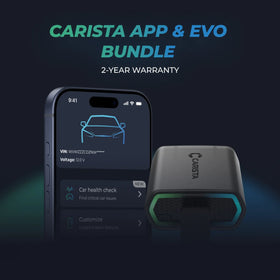
Yes, each Carista Scanner includes a 2-year warranty.

If you suspect the Scanner is faulty, double-check that it's securely plugged in, your car's ignition is on, and it's connected to the Carista App via Bluetooth. If the problem remains, find the gear icon at the bottom right of your Carista App screen and select "Report a problem." Our experts will help you troubleshoot or guide you through replacing the faulty scanner.
Does installing a Carista EVO scanner void my car's warranty?
Using an OBD-II (On-Board Diagnostics) scanner to monitor your vehicle's performance, diagnose issues, or gather data should not void your car's warranty. The OBD2 port is a standardized diagnostic interface that allows external devices to read information from the vehicle's computer system.

Our OBD Scanners are of high quality and are designed to work seamlessly with your vehicle’s computer system.

However, checking your vehicle’s warranty terms and conditions is important to see if using a particular OBD2 device or modification would impact your warranty coverage.
How do I connect the Carista EVO scanner?
Just plug the scanner into your car and start using the app. There’s no prior setup, pairing, or connecting necessary. Just make sure your phone/tablet’s Bluetooth is turned on. When the Carista app asks you what kind of scanner you’re using select Carista.
Vezi toate întrebările frecvente

Întrebări frecvente

Is using the Carista app and scanner safe, and how is my vehicle data protected?
Yes, using the Carista App and Scanners is safe.

Our company, certified with TISAX, achieved TISAX level 2 certification in January 2024, ensuring the highest information security standards. Trusted Information Security Assessment Exchange (TISAX) is a collection of information security policies we adhere to. We strictly follow them, utilizing advanced encryption and security protocols to protect your vehicle data, ensuring it remains confidential and secure at all times.

By implementing security measures, Carista ensures that using our App and Scanners is not only convenient for vehicle customizations and diagnostics but also safe and secure for your personal data.TEst
Does the Carista scanner include a warranty?
Yes, each Carista Scanner includes a 2-year warranty.

If you suspect the Scanner is faulty, double-check that it's securely plugged in, your car's ignition is on, and it's connected to the Carista App via Bluetooth. If the problem remains, find the gear icon at the bottom right of your Carista App screen and select "Report a problem." Our experts will help you troubleshoot or guide you through replacing the faulty scanner.
Does installing a Carista EVO scanner void my car's warranty?
Using an OBD-II (On-Board Diagnostics) scanner to monitor your vehicle's performance, diagnose issues, or gather data should not void your car's warranty. The OBD2 port is a standardized diagnostic interface that allows external devices to read information from the vehicle's computer system.

Our OBD Scanners are of high quality and are designed to work seamlessly with your vehicle’s computer system.

However, checking your vehicle’s warranty terms and conditions is important to see if using a particular OBD2 device or modification would impact your warranty coverage.
How do I connect the Carista EVO scanner?
Just plug the scanner into your car and start using the app. There’s no prior setup, pairing, or connecting necessary. Just make sure your phone/tablet’s Bluetooth is turned on. When the Carista app asks you what kind of scanner you’re using select Carista.
Vezi toate întrebările frecvente