Το Ford E-Transit 1st gen σας υποστηρίζεται

92 διαθέσιμες λειτουργίες

Αλλαγή επιλογής

Το Ford E-Transit 1st gen σας υποστηρίζεται

92 διαθέσιμες λειτουργίες

Αλλαγή επιλογής
Διαθέσιμες λειτουργίες για το αυτοκίνητό σας
Λειτουργίες αναζήτησης

Προσαρμογή

Ξεκλειδώστε λειτουργίες που έχει κρύψει ο κατασκευαστής για να ενισχύσετε την ασφάλεια, να αναβαθμίσετε το σύστημα ψυχαγωγίας και ενημέρωσης και να εξατομικεύσετε την οδήγησή σας.
55
Most Popular 10
Chassis & Engine 1
Dings & Warnings 6
Driver Assist 1
Instruments: Displays & Nav 3
Instruments: Language & Units 4
Lights: Coming/Leaving Home 3
Lights: Daytime Running Lights (DRL) 7
Lights: Exterior 6
Locking: Automatic 5
Locking: Beep & Blink 4
Locking: Doors & Alarm 2
Windows & Sunroof 2
Wipers & Washer 1

Διάγνωση

Διαγνώστε τις προειδοποιητικές λυχνίες του ταμπλό για ABS, SRS, κινητήρα, κιβώτιο ταχυτήτων, TPMS, HVAC και άλλα συστήματα και διαγράψτε άμεσα τους κωδικούς βλαβών.
22
Basic OBD2
Engine
ABS
Instrument cluster
Central electronics
Parking sensors
Multimedia gateway
Restraints
Radio
Power steering
CAN network gateway
Heater & air conditioning
Audio front
Battery regulator A
Steering column
Central electronics C
Telematics
Pedestrian alert
Air conditioning
DC converter
Secondary OBD A
External charger

Ζωντανά δεδομένα

Μείνετε ενημερωμένοι με δεδομένα σε πραγματικό χρόνο από ολόκληρο το όχημα, όπως στροφές κινητήρα, ταχύτητα, προσαρμογές καυσίμου, δεδομένα αισθητήρα οξυγόνου (O2), θερμοκρασία ψυκτικού/λαδιού και πολλά άλλα.
10
Transmission live data
Engine data
Car battery info
EV/Hybrid battery live data
Diesel Particulate Filter (DPF) info
Vehicle mileage information
HVAC live data
Airbag crashes count report
Wheel speed live data
Basic OBD2 live data

Σέρβις

Διαχειριστείτε μόνοι σας τα διαστήματα συντήρησης, την επαναφορά συντήρησης/λαδιών, την επαναφορά TPMS, την επαναφορά EPB, την καταχώριση μπαταρίας, την αναγέννηση DPF και άλλες επιλογές συντήρησης.
5
Electronic parking brake service
Battery registration
Headlights basic setting
Detailed ECU info
Acceleration test

Όλες οι διαθέσιμες λειτουργίες

Προσαρμογή

Ξεκλειδώστε λειτουργίες που έχει κρύψει ο κατασκευαστής για να ενισχύσετε την ασφάλεια, να αναβαθμίσετε το σύστημα ψυχαγωγίας και ενημέρωσης και να εξατομικεύσετε την οδήγησή σας.
55 λειτουργίες
Most Popular 10
Chassis & Engine 1
Dings & Warnings 6
Driver Assist 1
Instruments: Displays & Nav 3
Instruments: Language & Units 4
Lights: Coming/Leaving Home 3
Lights: Daytime Running Lights (DRL) 7
Lights: Exterior 6
Locking: Automatic 5
Locking: Beep & Blink 4
Locking: Doors & Alarm 2
Windows & Sunroof 2
Wipers & Washer 1
Basic OBD2
Engine
ABS
Instrument cluster
Central electronics
Parking sensors
Multimedia gateway
Restraints
Radio
Power steering
CAN network gateway
Heater & air conditioning
Audio front
Battery regulator A
Steering column
Central electronics C
Telematics
Pedestrian alert
Air conditioning
DC converter
Secondary OBD A
External charger
Transmission live data
Engine data
Car battery info
EV/Hybrid battery live data
Diesel Particulate Filter (DPF) info
Vehicle mileage information
HVAC live data
Airbag crashes count report
Wheel speed live data
Basic OBD2 live data
Electronic parking brake service
Battery registration
Headlights basic setting
Detailed ECU info
Acceleration test

Δεν είστε σίγουροι ότι μια λειτουργία θα λειτουργήσει στο συγκεκριμένο Ford E-Transit σας; Δοκιμάστε την Carista χωρίς ρίσκο, με την εγγύηση επιστροφής χρημάτων 30 ημερών.

Ford E-Transit (1st gen)

92+ λειτουργίες

Είστε έτοιμοι να πάρετε τον έλεγχο του Ford E-Transit σας;

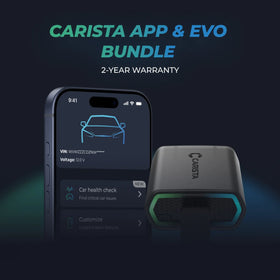
ΕυπώλητοCarista Bundle: EVO + 12-Month PRO

Carista Bundle: EVO + 12-Month PRO

Σαρωτής £15.00 + £4.99/μήνα για την εφαρμογή

Είστε έτοιμοι να πάρετε τον έλεγχο του Ford E-Transit σας;

ΕυπώλητοCarista Bundle: EVO + 12-Month PRO

Carista Bundle: EVO + 12-Month PRO

Σαρωτής £15.00 + £4.99/μήνα για την εφαρμογή

Συχνές Ερωτήσεις

Is using the Carista app and scanner safe, and how is my vehicle data protected?
Yes, using the Carista App and Scanners is safe.

Our company, certified with TISAX, achieved TISAX level 2 certification in January 2024, ensuring the highest information security standards. Trusted Information Security Assessment Exchange (TISAX) is a collection of information security policies we adhere to. We strictly follow them, utilizing advanced encryption and security protocols to protect your vehicle data, ensuring it remains confidential and secure at all times.

By implementing security measures, Carista ensures that using our App and Scanners is not only convenient for vehicle customizations and diagnostics but also safe and secure for your personal data.TEst
Does the Carista scanner include a warranty?
Yes, each Carista Scanner includes a 2-year warranty.

If you suspect the Scanner is faulty, double-check that it's securely plugged in, your car's ignition is on, and it's connected to the Carista App via Bluetooth. If the problem remains, find the gear icon at the bottom right of your Carista App screen and select "Report a problem." Our experts will help you troubleshoot or guide you through replacing the faulty scanner.
Does installing a Carista EVO scanner void my car's warranty?
Using an OBD-II (On-Board Diagnostics) scanner to monitor your vehicle's performance, diagnose issues, or gather data should not void your car's warranty. The OBD2 port is a standardized diagnostic interface that allows external devices to read information from the vehicle's computer system.

Our OBD Scanners are of high quality and are designed to work seamlessly with your vehicle’s computer system.

However, checking your vehicle’s warranty terms and conditions is important to see if using a particular OBD2 device or modification would impact your warranty coverage.
How do I connect the Carista EVO scanner?
Just plug the scanner into your car and start using the app. There’s no prior setup, pairing, or connecting necessary. Just make sure your phone/tablet’s Bluetooth is turned on. When the Carista app asks you what kind of scanner you’re using select Carista.
Δείτε όλες τις συχνές ερωτήσεις

Συχνές Ερωτήσεις

Is using the Carista app and scanner safe, and how is my vehicle data protected?
Yes, using the Carista App and Scanners is safe.

Our company, certified with TISAX, achieved TISAX level 2 certification in January 2024, ensuring the highest information security standards. Trusted Information Security Assessment Exchange (TISAX) is a collection of information security policies we adhere to. We strictly follow them, utilizing advanced encryption and security protocols to protect your vehicle data, ensuring it remains confidential and secure at all times.

By implementing security measures, Carista ensures that using our App and Scanners is not only convenient for vehicle customizations and diagnostics but also safe and secure for your personal data.TEst
Does the Carista scanner include a warranty?
Yes, each Carista Scanner includes a 2-year warranty.

If you suspect the Scanner is faulty, double-check that it's securely plugged in, your car's ignition is on, and it's connected to the Carista App via Bluetooth. If the problem remains, find the gear icon at the bottom right of your Carista App screen and select "Report a problem." Our experts will help you troubleshoot or guide you through replacing the faulty scanner.
Does installing a Carista EVO scanner void my car's warranty?
Using an OBD-II (On-Board Diagnostics) scanner to monitor your vehicle's performance, diagnose issues, or gather data should not void your car's warranty. The OBD2 port is a standardized diagnostic interface that allows external devices to read information from the vehicle's computer system.

Our OBD Scanners are of high quality and are designed to work seamlessly with your vehicle’s computer system.

However, checking your vehicle’s warranty terms and conditions is important to see if using a particular OBD2 device or modification would impact your warranty coverage.
How do I connect the Carista EVO scanner?
Just plug the scanner into your car and start using the app. There’s no prior setup, pairing, or connecting necessary. Just make sure your phone/tablet’s Bluetooth is turned on. When the Carista app asks you what kind of scanner you’re using select Carista.
Δείτε όλες τις συχνές ερωτήσεις