Your SEAT Ateca 1st gen is supported
75 features available
What SEAT Ateca owners customize most
- PopularGauge needle sweep at startup
- PopularSeat belt warning
- PopularLane-change turn signal auto-flasher count
- PopularBeep when locking with remote
- PopularBeep when unlocking with remote
- PopularRefuel quantity in MFD
Search features
Customize
Unlock manufacturer-hidden features to boost security, upgrade your infotainment system, and personalize your drive.278
Most Popular 10
Chassis & Engine 10
Dings & Warnings 8
Driver Assist 5
Heater & A/C 7
Instruments: Displays & Nav 47
Instruments: Language & Units 10
Lights: Bulb Checks 20
Lights: Coming/Leaving Home 17
Lights: Daytime Running Lights (DRL) 14
Lights: Exterior 38
Lights: Interior 8
Locking: Automatic 4
Locking: Beep & Blink 6
Locking: Doors & Alarm 5
Locking: Smart Key (KESSY) 6
Mirrors 9
Parking Sensors 8
Seats & Steering Wheel 15
Trunk 4
Windows & Sunroof 17
Wipers & Washer 4
Other 6
278
Show more Show less
Diagnose
Diagnose dashboard warning lights for ABS, SRS, Engine, Transmission, TPMS, HVAC, and more, and clear fault codes instantly.21
Basic OBD2
CAN network gateway
Engine
Transmission
ABS
Power steering
Steering wheel
Airbags
Instrument cluster
Infotainment system
Heater & air conditioning
Parking/steering assist
All-wheel-drive system
Central electronics
Driver's door
Front passenger's door
Trunk
Ignition authorization
Adaptive cruise control
Steering column lock
Multifunctional module
21
Show more Show less
Live Data
Stay informed with real-time data across the vehicle, including engine RPM, speed, fuel trims, oxygen (O2) sensor data, coolant/oil temperature, and more.13
Transmission live data
Launch control count
Airbag crashes count report
Service interval info
Wheel speed live data
Car battery info
Engine turbo live data
HVAC live data
Engine data
Diesel Exhaust Fluid (DEF) level
Diesel Particulate Filter (DPF) info
Vehicle mileage information
Basic OBD2 live data
13
Show more Show less
Service
Manage service intervals, service/oil reset, TPMS reset, EPB reset, battery registration, DPF regeneration, and other service options on your own.18
Used car checks
Video in Motion
MirrorLink in Motion
Service indicator reset
Electronic parking brake service
Diesel Particulate Filter (DPF) regeneration
Battery registration
Throttle body adaptation
Fuel system prime
Basic setting of transmission
Haldex pump learn calibration
TPMS reset
Instrument cluster colors test
Instrument cluster gong test
Climatronic display segment test
Detailed ECU info
Emission tests
Acceleration test
18
Show more Show less
All available features
Customize
Unlock manufacturer-hidden features to boost security, upgrade your infotainment system, and personalize your drive.278 features
Most Popular 10
Chassis & Engine 10
Dings & Warnings 8
Driver Assist 5
Heater & A/C 7
Instruments: Displays & Nav 47
Instruments: Language & Units 10
Lights: Bulb Checks 20
Lights: Coming/Leaving Home 17
Lights: Daytime Running Lights (DRL) 14
Lights: Exterior 38
Lights: Interior 8
Locking: Automatic 4
Locking: Beep & Blink 6
Locking: Doors & Alarm 5
Locking: Smart Key (KESSY) 6
Mirrors 9
Parking Sensors 8
Seats & Steering Wheel 15
Trunk 4
Windows & Sunroof 17
Wipers & Washer 4
Other 6
Diagnose
Diagnose dashboard warning lights for ABS, SRS, Engine, Transmission, TPMS, HVAC, and more, and clear fault codes instantly.21 features
Basic OBD2
CAN network gateway
Engine
Transmission
ABS
Power steering
Steering wheel
Airbags
Instrument cluster
Infotainment system
Heater & air conditioning
Parking/steering assist
All-wheel-drive system
Central electronics
Driver's door
Front passenger's door
Trunk
Ignition authorization
Adaptive cruise control
Steering column lock
Multifunctional module
Live Data
Stay informed with real-time data across the vehicle, including engine RPM, speed, fuel trims, oxygen (O2) sensor data, coolant/oil temperature, and more.13 features
Transmission live data
Launch control count
Airbag crashes count report
Service interval info
Wheel speed live data
Car battery info
Engine turbo live data
HVAC live data
Engine data
Diesel Exhaust Fluid (DEF) level
Diesel Particulate Filter (DPF) info
Vehicle mileage information
Basic OBD2 live data
Service
Manage service intervals, service/oil reset, TPMS reset, EPB reset, battery registration, DPF regeneration, and other service options on your own.18 features
Used car checks
Video in Motion
MirrorLink in Motion
Service indicator reset
Electronic parking brake service
Diesel Particulate Filter (DPF) regeneration
Battery registration
Throttle body adaptation
Fuel system prime
Basic setting of transmission
Haldex pump learn calibration
TPMS reset
Instrument cluster colors test
Instrument cluster gong test
Climatronic display segment test
Detailed ECU info
Emission tests
Acceleration test
Not sure a feature will work on your specific SEAT Ateca? Try Carista risk-free with our 30-day money-back guarantee.
Most Popular
Gauge needle sweep at startup
Note that you might need to turn the ignition off and back on twice for the customization to take effect.
Seat belt warning
Lane-change turn signal auto-flasher count
You may also need to reset your 'Lights' settings to 'Factory defaults' in your infotainment system for this customization to work.
Beep when locking with remote
You must activate "acoustic confirmation" in your infotainment system for this customization to work.
Beep when unlocking with remote
You must activate "acoustic confirmation" in your infotainment system for this customization to work.
Refuel quantity in MFD
Daytime running lights
Start screen logo (infotainment)
Which start screen logos are supported is dependent on the module's firmware. Please note that setting a start screen logo which isn't supported may cause a "01543 - incorrectly coded" fault code - returning the original logo should fix the issue.
Coming-home lights duration
Auto-lock doors when moving
If this customization doesn't have any effect, please try resetting your infotainment to its factory settings.
Chassis & Engine
Vehicle low-power mode
Enabled
Disabled
Enabling this mode can be used for storage/transportation purposes. Note that when the mode is enabled your keyfob and alarm will be deactivated!
Distance until low-power mode gets deactivated
Disable auto start/stop system (method A) (may not work on 2019+ models)
To disable the start/stop system, set the voltage value to over 12 volts. You won't get any indication that the system is off.
Disable auto start/stop system (method B) (may not work on 2019+ models)
Yes
No
You won't get any indication that the system is off.
Power steering default mode
Driving profile selection
Comfort
Automatic
Dynamic
Default
Throttle response behavior
Gradual, controlled by time
Direct, controlled by threshold
ESC / ASR
ESC button inactive
ASR off
ESC sport
ESC off
ASR off / ESC off version 1
ESC sport / ESC off version 1
ASR off / ESC off version 2
ESC sport / ESC off version 2
ASR off / ESC sport
Haldex AWD system setup
Standard
Increased traction (more power to rear wheels)
Reduced noise
Extended electronic differential lock strength (XDS)
Off
Normal
Weak
Medium
High
Rear wing control
not installed
Fix rear wing position
Raise rear wing automatically
Reserved
This setting will only work if your car has an active rear wing (Audi TT and TTS). To fix the spoiler in the raised/lowered position, first press the spoiler's button on selected position, then use fix rear wing function.
Dings & Warnings
Seat belt warning
Enabled
Disabled
Seat belt warning type
Disabled
US/Canada style
Euro style
Speed warning at 120 km/h (75 mph)
Yes
No
Speed warning at 120 km/h (75 mph) (India)
Yes
No
Ding when key is left in ignition
Off
Driver's door
All doors
Warning in dash display that low beam is turned off
No
When light switch is "OFF"
When light switch is in "Parking light"
When light switch is "OFF" or in "Parking light"
Ice warning temperature threshold (when exiting the vehicle)
Ice warning temperature threshold (when entering the vehicle)
Driver Assist
Adaptive cruise control overtaking on the right
Enabled
Disabled
Adaptive cruise control default distance menu in MMI
Enabled
Disabled
Dynamic start assist
Early
Normal
Late
Hill start assist disengagement
Early
Normal
Late
Hill start assist activation threshold
Heater & A/C
Climate control temperature with remote start
Fixed temperature
Last set temperature
Target the temperature of the A/C heater using the remote start control
To enable this option, the climate control temperature with remote start must be set to a fixed value.
Ambient temp at which the seat heater will start on with remote start
Remember recirculating air state
Yes
No
Automatic system management
Reserved
Remember Air Care state
Yes
No
Timer based
Show A/C blower speed when in AUTO
Yes
No
Temperature adjustment for hot countries
Enabled
Disabled
Instruments: Displays & Nav
Gauge needle sweep at startup
Yes
No
Note that you might need to turn the ignition off and back on twice for the customization to take effect.
Gauge needle sweep at startup (method B)
Yes
No
Developer menu screen in MMI via holding MENU for ~10 seconds (req. Discover Pro)
Enabled
Disabled
Start screen logo (infotainment)
None
Type 1
Type 2
Type 3
Type 4
Type 5
Type 6
Type 7
Type 8
Type 9
Type 10
Type 11
Type 12
Type 13
Type 14
Type 15
Which start screen logos are supported is dependent on the module's firmware. Please note that setting a start screen logo which isn't supported may cause a "01543 - incorrectly coded" fault code - returning the original logo should fix the issue.
Start screen logo (instrument cluster)
Type 1
Type 2
Type 3
Type 4
Type 5
Type 6
Type 7
Type 8
Tachometer highlight mode
Instrument cluster LCD background
Default
Carbon fiber
Virtual instrument cluster theme
Type 1
Type 2
Type 3
Type 4
Type 5
Type 6
Type 7
Type 8
Virtual instrument cluster theme - color 1
None
White
Cyan
Aquamarine
Light blue
Blue
Purple
Violet
Green
Green (variant 2)
Yellow
Orange
Red
Instrument cluster lights always active
Enabled
Disabled
Not available
You must also enable Scandinavian DRL: daytime running lights activate taillights and parking lights for this customization to work.
Audio level gain (FM)
Audio level gain (AM)
Audio level gain (SAT)
Microphone sensitivity
Driver information system (DIS) display
Enabled
Disabled
Lap timer (if equipped) (method B)
Enabled
Disabled
Not available
This timer is visible in certain pages that can be unlocked with the Dashboard view pages settings, and the timer can be found by changing the currently viewed parameter with the steering wheel arrows.
Maximum distance interval until inspection
Maximum time between time-dependent inspections
Allow enabling oil temperature display via MMI
Enabled
Disabled
Oil temperature display
Enabled
Disabled
Efficiency program display
Yes
No
Refuel quantity in MFD
Enabled
Disabled
Show digital speed in dashboard (BC)
Enabled
Disabled
Bluetooth availability
Enabled
Disabled
Bluetooth functions in MMI
Enabled
Disabled
If activating this setting, make sure that Bluetooth availability is set to ON.
Bluetooth headphones
Enabled
Disabled
If activating this setting, make sure that Bluetooth availability is set to ON.
Overlay car overview when rear camera is activated (requires infotainment reboot)
Enabled
Disabled
Telephone menu display
Enabled
Disabled
USB configuration
Off
Charging only
Charging & data
iPhone support
To use this retrofit setting, your infotainment unit must support CarPlay and have a retrofitted USB port compatible with CarPlay, along with a CarPlay license.
Navigation compass display
Enabled
Disabled
Compass display position
Right of the time display
Left of the time display
Ambient temperature display
Enabled
Disabled
Allow "Car" settings in MMI while car is in motion
Yes
No
Allow "Tuner" settings in MMI while car is in motion
Yes
No (variant 1)
No (variant 2)
No (use with VW Jetta only)
Allow "Media" settings in MMI while car is in motion
Yes
No
No (use with VW Jetta only)
Allow "Phone" settings in MMI while car is in motion
Yes
No
No (use with VW Jetta only)
Show "Follow traffic regulations" disclaimer in infotainment
Yes
No
Show AM frequency in infotainment (req. infotainment reboot)
Yes
No
AUX input
Enabled
Disabled
Activate subwoofer and center speaker output pins
Yes
No
This customization requires that your car is equipped with a subwoofer.
Average fuel consumption calibration
Driving school mode for MIB2 (step 1 of 3)
Enabled
Disabled
Driving school mode for MIB2 (step 2 of 3)
Enabled
Disabled
Driving school mode for MIB2 (step 3 of 3)
Enabled
Disabled
Please note that this customization requires infotainment reboot.
"Offroad information" screen in MIB (req. MIB2 and Navigation) (step 1 of 3)
Enabled
Disabled
This customization requires that your car is equipped with a satellite navigation system.
"Offroad information" screen in MIB (req. MIB2 and Navigation) (step 2 of 3)
Enabled
Disabled
"Offroad information" screen in MIB (req. MIB2 and Navigation) (step 3 of 3)
Enabled
Disabled
Please note that this customization requires infotainment reboot.
Instruments: Language & Units
Daylight Saving Time (DST) (req. infotainment reboot)
Off
Manual
Europe
USA
Time display format
24h
12h am/pm
Date display format
dd/mm/yyyy
mm/dd/yyyy
yyyy/mm/dd
Temperature display units
Celsius
Fahrenheit
Distance display units
km
miles
Speed display units
km/h
mph
Consumption display units
mpg (UK)
mpg (US)
l/100km
km/l
Pressure display units
Bar
PSI
kPa
Volume display units
Liters
Gallons (UK)
Gallons (US)
Traffic message channel (TMC)
TMC Pro for MIB1
TMC Pro for MIB2
TMC Pro for MIB2 and online traffic information
TMC Canada
TMC Australia (Suna Traffic)
Disabled (developer options)
Disabled
You also need to enable TP and RDS in your radio's menu for this to work. Also keep in mind that you might need to wait an hour or so for the feature it to start receiving messages.
Lights: Bulb Checks
Bulb check: footwell lights
Disabled
12W general light bulb
LED low power
General LED up to 12W
General LED
Bulb check: license plate lights (step 1 of 2)
Enabled
Disabled
General light bulb interior or exterior light
General LED up to 12W
LED
General LED up to 6W
Note that you need to enable all steps for this to work.
Bulb check: license plate lights (step 2 of 2)
Enabled
Disabled
Note that you need to enable all steps for this to work.
Bulb check: daytime running lights (left)
Disabled
LED lights
12W general light bulb
LED low power
General LED up to 6W
6W general incandescent lamp
Bulb check: daytime running lights (right)
Disabled
LED lights
12W general light bulb
LED low power
General LED up to 6W
6W general incandescent lamp
Bulb check: low beam front left lights
Disabled
Xenon
LED
LED light module
Dimmed headlights
Bulb check: low beam front right lights
Disabled
Xenon
LED
LED light module
Dimmed headlights
Bulb check: front left fog lights
Disabled
LED lights
General headlights
LED light module
4* 3W
Bulb check: front right fog lights
Disabled
LED lights
General headlights
LED light module
4* 3W
Bulb check: front left indicator lights
Disabled
12W general light bulb
LED module turn signals
LED low power
General LED up to 12W
Flashing lights
LED flashing lights
General LED
LED low power
LED BLK open load U from 65 T200
Bulb check: front right indicator lights
Disabled
12W general light bulb
LED module turn signals
LED low power
General LED up to 12W
Flashing lights
LED flashing lights
General LED
LED low power
LED BLK open load U from 65 T200
Bulb check: rear right indicator lights (inside)
Disabled
12W general light bulb
General LED up to 12W
LED flashing lights
General LED
LED low power
Bulb check: rear left parking/brake light
Disabled
Brake lights
Combined flashing and brake lights
LED brake lights
LED combined flashing and brake lights
LED brake lights
General LED
Bulb check: rear right parking/brake light
Disabled
Brake lights
Combined flashing and brake lights
LED brake lights
LED combined flashing and brake lights
LED brake lights
General LED
Bulb check: rear left parking light (inside)
Disabled
27W general light bulb also H15
6W general incandescent lamp
2* 6W
3* 5W
4* 5W
LED brake lights
General LED up to 12W
General LED
General LED
Bulb check: rear right parking light (inside)
Disabled
27W general light bulb also H15
6W general incandescent lamp
2* 6W
3* 5W
4* 5W
LED brake lights
General LED up to 12W
General LED
General LED
Bulb check: rear left fog light (inside)
Disabled
LED daytime running lights module supply
27W general light bulb also H15
General LED up to 12W
General LED
General LED up to 6W
Bulb check: rear right fog light (inside)
Disabled
LED daytime running lights module supply
27W general light bulb also H15
General LED up to 12W
LED low power
General LED up to 12W
LED low power
General LED
General LED up to 6W
Bulb check: rear left reverse light (inside)
Disabled
12W general light bulb
27W general light bulb also H15
21W rear fog bulb
General LED up to 12W
LED brake lights
LED combined flashing and brake lights
General LED up to 12W
General LED
General LED
Bulb check: rear right reverse light (inside)
Disabled
12W general light bulb
27W general light bulb also H15
General headlights
General LED up to 12W
General LED
General LED
Lights: Coming/Leaving Home
Coming-home lights
Enabled
Disabled
Coming-home lights mode
Manual: flash high beams to activate
Automatic: when it's dark (req. auto headlights)
Disabled
Coming-home lights trigger
When ignition is switched off
When door is opened
Coming-home lights use…
Low beams
Fog lights
Daytime running light (DRL) (left) with…
None
Left turn signal
Left fog light
Coming/Leaving Home
Daytime running light (DRL) (right) with…
None
Right turn signal
Right fog light
Coming/Leaving Home
Use reverse light (left) as coming/leaving-home lights
Disabled
Enabled
Brake light blink after turn signal
Use reverse light (right) as coming/leaving-home lights
Disabled
Enabled
Turn signal (left) on with coming/leaving home lights
Disabled
Enabled
Turn signal (right) on with coming/leaving home lights
Disabled
Enabled
Turn signal (left) brightness on with coming/leaving home lights
Turn signal (right) brightness on with coming/leaving home lights
Coming-home lights duration
Leaving-home lights (req. auto headlights) (step 1 of 2)
Enabled
Disabled
Leaving-home lights (req. auto headlights) (step 2 of 2)
Enabled
Disabled
Leaving-home lights duration
Menu for coming/leaving-home lights duration
Enabled
Disabled
Lights: Daytime Running Lights (DRL)
Daytime running lights
Enabled
Disabled
Allow configuring daytime running lights via dash display
Yes
No
Inner taillight brightness (left)
Inner taillight brightness (right)
Scandinavian DRL: daytime running lights activate taillights and parking lights
Yes
No
Turn off daytime running lights when parking brake is on
Yes
No
Turn off daytime running lights (left) ("wink") when turn signal is on (step 1 of 2)
Enabled
Disabled
Note that you need to enable all steps for this to work.
Turn off daytime running lights (left) ("wink") when turn signal is on (step 2 of 2)
Enabled
Disabled
If you are activating this setting make sure that the brightness option for it is above 0.
Gradual daytime running lights wink dimming value (left)
For this setting to work, all steps of "Turn off daytime running lights ("wink") when turn signal is on" setting has to be enabled for both left and right sides.
Turn off right daytime running lights ("wink") when turn signal is on (step 1 of 2)
Enabled
Disabled
Note that you need to enable all steps for this to work.
Turn off daytime running lights (right) ("wink") when turn signal is on (step 2 of 2)
Enabled
Disabled
If you are activating this setting make sure that the brightness option for it is above 0.
Gradual daytime running lights wink dimming value (right)
For this setting to work, all steps of "Turn off daytime running lights ("wink") when turn signal is on" setting has to be enabled for both left and right sides.
Parking light activates daytime running lights (DRL)
Yes
No
Daytime running lights on only when switch is set to AUTO
Yes
No
Lights: Exterior
Lane-change turn signal auto-flasher
Enabled
Disabled
You may also need to reset your 'Lights' settings to 'Factory defaults' in your infotainment system for this customization to work.
Lane-change turn signal auto-flasher count
You may also need to reset your 'Lights' settings to 'Factory defaults' in your infotainment system for this customization to work.
Blind spot indicators brightness
High beam assist: remember last state
Yes
No
Right taillight configuration (non-NAR)
Disabled
Right taillight when trunk is open (non-NAR)
Brake light blink after turn signal
Acknowledgment_function 1
Parking light right
Coming home or Leaving home lights activated
This customization isn't applicable for cars produced for the North American market (USA & Canada).
Left taillight configuration (non-NAR)
Disabled
Left taillight when trunk is open (non-NAR)
Brake light blink after turn signal
Parking light left
Acknowledgment_function 1
Coming home or Leaving home lights activated
This customization isn't applicable for cars produced for the North American market (USA & Canada).
Right taillight when trunk is open (NAR) (step 1 of 2)
Enabled
Disabled
Brake light blink after turn signal
This customization is only applicable for cars produced for the North American market (USA & Canada).
Right taillight when trunk is open (NAR) (step 2 of 2)
Enabled
Disabled
This customization is only applicable for cars produced for the North American market (USA & Canada).
Left taillight when trunk is open (NAR) (step 1 of 2)
Enabled
Disabled
Brake light blink after turn signal
This customization is only applicable for cars produced for the North American market (USA & Canada).
Left taillight when trunk is open (NAR) (step 2 of 2)
Enabled
Disabled
This customization is only applicable for cars produced for the North American market (USA & Canada).
Auto headlights activation threshold
Low
Normal
High
Turn off front fog lights when high beams are on
Yes
No
Activate dashboard warning for rear fog lights when driving at…
Turn on front fog lights (left) when high beams are on
Enabled
Disabled
If you are activating this setting make sure that the brightness option for it is above 0.
Turn on fog (front left) lights with high flash to pass
Enabled
Disabled
If you are activating this setting make sure that the brightness option for it is above 0.
Front fog lights (left) brightness when used with high beams
Turn on front fog lights (right) when high beams are on
Enabled
Disabled
If you are activating this setting make sure that the brightness option for it is above 0.
Turn on fog lights (front right) with high flash to pass
Enabled
Disabled
If you are activating this setting make sure that the brightness option for it is above 0.
Front fog lights (right) brightness when used with high beams
Flash rear fogs along with flash-to-pass when headlights are on
Enabled
Disabled
On with parking lights
Coming home or Leaving home lights activated
High beam (left)
Flash rear fogs along with flash-to-pass when headlights are off
Enabled
Disabled
Parking light left
Daytime running lights
Turn on fog lights on reverse
Enabled
Disabled
To use this setting, enable the cornering lights.
Fog light (rear left) (step 1 of 2)
Enabled (Version 1)
Enabled (Version 2)
Disabled (variant 1)
Disabled (variant 2)
Brake lights
Rear fog light for left-hand drive cars without a trailer
On with parking lights
Rear fog light for right-hand drive cars without a trailer
Fog light (rear left) (step 2 of 2)
Adjust the light brightness percentage from 0 to 100.
Flash brake lights in emergency stopping
Yes
No
Flash brake lights in emergency stopping (Phase 2)
Yes
No
Flash hazard lights in emergency stopping
Yes
No
Reverse light brightness (left)
Reverse light brightness (right)
Puddle lights driver side
Enabled
Disabled
Puddle lights passenger side
Enabled
Disabled
Door warning lights passenger side
Enabled
Disabled
Puddle lights while driver-side mirror is folding
Enabled
Disabled
Puddle lights while passenger-side mirror is folding
Enabled
Disabled
Left cornering light (using fog light)
Off
On
Coming home or Leaving home lights activated
Cornering lights activation
Disabled
Steering wheel is turned (method A)
Steering wheel is turned / blinker on (method A)
Steering wheel is turned (method B)
Steering wheel is turned / blinker on (method B)
Not defined
Cornering lights minimum activation speed
Cornering lights maximum activation speed
Lights: Interior
Footwell lights (Step 1 of 3)
Enabled
Disabled
Footwell lights (Step 2 of 3)
Enabled
Disabled
Footwell lights (Step 3 of 3)
Enabled
Disabled
Footwell lights brightness
Turn on interior lights when trunk is opened
Yes
No
Pulsating start/stop button light (step 1 of 2)
Enabled
Disabled
<b>WARNING: The proper functioning of this setting depends on the start/stop button's placement!</b> It operates correctly when the start/stop button is placed close to the gear lever in the center console. If the button is located on the steering wheel, enabling this setting will result in blinking buttons near the gear lever.
Pulsating start/stop button light (step 2 of 2)
Enabled
Disabled
<b>WARNING: The proper functioning of this setting depends on the start/stop button's placement!</b> It operates correctly when the start/stop button is placed close to the gear lever in the center console. If the button is located on the steering wheel, enabling this setting will result in blinking buttons near the gear lever.
Interior lights gradually fade in/out when exterior lights are turned on/off
Enabled
Disabled
Locking: Automatic
Auto-lock doors when moving
Yes
No
If this customization doesn't have any effect, please try resetting your infotainment to its factory settings.
Auto-unlock doors when key is taken out of ignition
Yes
No
Auto-unlock doors when shifting into park (P)
Yes
No
Car lock and trunk lid close (and lock) via easy close button
Enabled
Disabled
Trailer tow hitch installed
Gesture-based trunk opening activated
Kick-activated trunk
Locking: Beep & Blink
Allow configuring beep when locking/unlocking
Yes
No
Beep when locking with remote
Yes
No
You must activate "acoustic confirmation" in your infotainment system for this customization to work.
Beep when unlocking with remote
Yes
No
You must activate "acoustic confirmation" in your infotainment system for this customization to work.
Menu for configuring beep when locking/unlocking
Enabled
Disabled
Beep when locking/unlocking doors comes from the…
Alarm system
Horn
Duration of beep when locking/unlocking with remote (horn only)
Normal
Short
Locking: Doors & Alarm
Alarm system (step 1 of 5)
Enabled
Disabled
Alarm system (step 2 of 5)
Enabled
Disabled
Alarm system (step 3 of 5)
Enabled
Disabled
Alarm system (step 4 of 5)
Enabled
Disabled
Alarm system (step 5 of 5)
Enabled
Disabled
Locking: Smart Key (KESSY)
Auto-lock when doors are closed and smart key is outside vehicle (step 1 of 2)
Yes
No
Auto-lock when doors are closed and smart key is outside vehicle (step 2 of 2)
Yes
No
Passive entry via smart key (driver's door)
Yes
No
Passive exit via smart key (driver's door)
Yes
No
Passive entry via smart key (passenger's door)
Yes
No
Passive exit via smart key (passenger's door)
Yes
No
Mirrors
Allow auto-folding mirrors
Yes
No
Auto fold side-view mirrors (req. power folding mirrors)
Yes
No
Auto unfold side-view mirrors when vehicle is unlocked
Yes
No
Allow configuring auto-folding mirrors in infotainment
Enabled
Disabled
Auto fold mirrors via…
Long press
Single click
Allow lowering passenger-side mirror when in reverse gear
Yes
No
Lower passenger-side mirror when in reverse gear
Yes
No
Note that this works only if your power mirror switch is set to control the passenger-side mirror.
Menu for lowering passenger-side mirror when in reverse gear
Yes
No
Synchronous mirror adjustment menu in infotainment
Enabled
Disabled
Parking Sensors
Park distance visualization type
Off
Optical Parking System (OPS) display
Optical Parking System (OPS) 360-degree view
Rear view camera
Enabled
Disabled
This setting only applies to cars that have a rear view camera installed.
PDC switch off speed
Beep when parking sensor activated
Yes
No
Rear parking sensor beep volume
Customization may be reset on next ignition cycle.
Rear parking sensor beep tone
Front parking sensor beep volume
Front parking sensor beep tone
Seats & Steering Wheel
Auto-activate steering-wheel heater
Disabled
Use steering wheel temperature
Use outside air temperature
Remember driver's seat heater level
Yes
For 10 min only
No
Remember passenger's seat heater level
Yes
For 10 min only
No
Driver seat heater lower threshold temperature adjustment (Stage 1)
Driver seat heater upper threshold temperature adjustment (Stage 1)
Passenger seat heater lower threshold temperature adjustment (Stage 1)
Passenger seat heater upper threshold temperature adjustment (Stage 1)
Driver seat heater lower threshold temperature adjustment (Stage 2)
Driver seat heater upper threshold temperature adjustment (Stage 2)
Passenger seat heater lower threshold temperature adjustment (Stage 2)
Passenger seat heater upper threshold temperature adjustment (Stage 2)
Driver seat heater lower threshold temperature adjustment (Stage 3)
Driver seat heater upper threshold temperature adjustment (Stage 3)
Passenger seat heater lower threshold temperature adjustment (Stage 3)
Passenger seat heater upper threshold temperature adjustment (Stage 3)
Trunk
Pop trunk via remote
Enabled
Disabled
Deactivate opening power trunk via remote when trailer attached
Yes
No
Deactivate closing power trunk via remote when trailer attached
Yes
No
Power trunk beep
Yes
No
Windows & Sunroof
Enable settings for opening/closing windows and sunroof
Enabled
Disabled
Allow configuring open/close windows with remote via infotainment
Disabled
View-only
Adjustable
Open windows via long-press on remote (step 1 of 2)
Enabled
Disabled
Note that you need to enable all steps for this to work.
Open windows via long-press on remote (step 2 of 2)
Enabled
Disabled
Note that you need to enable all steps for this to work.
Close windows via long-press on remote (step 1 of 2)
Enabled
Disabled
Note that you need to enable all steps for this to work.
Close windows via long-press on remote (step 2 of 2)
Enabled
Disabled
Note that you need to enable all steps for this to work.
Open windows via long-press on remote (KESSY)
Enabled
Disabled
Lower window when driver door is opened
Enabled
Disabled
Lower window when front passenger door is opened
Enabled
Disabled
Open sunroof via long-press on remote
Yes
No
Note you may also need to enable opening/closing windows via remote for this to work.
Close sunroof via long-press on remote
Yes
No
Note you may also need to enable opening/closing windows via remote for this to work.
Sunroof action when opening via remote
Slide
Tilt
This customization may fail to save on some cars. If it does, that means your car doesn't support it.
Open/close convertible roof via long-press on remote (smart key required)
Yes
No
You must also enable all other comfort open/closing-related customizations for this to work.
Close convertible roof via long-press on remote
Yes
No
Blink turn signals when done closing windows via remote
Yes
No
Allow power window operation after ignition is turned off (except North American models)
Yes
No
Stop one-touch window movement after a door is opened
Enabled
Disabled
Wipers & Washer
Allow configuring front wipers in infotainment
Enabled
Disabled
Headlight washer activation time
Headlight washer activation delay
Activate headlight washers once every … times the windshield washer is used
Other
MIB2 personalisation profiles enable profile variant
Yes (variant 1)
Yes (variant 2)
Default
No
Only set this step if you have electric seat adjustment / mirror / steering wheel.
MIB2 personalisation profiles assignment to key
Enabled
Disabled
Only set this step if you have electric seat adjustment / mirror / steering wheel.
Windscreen heater (if equipped) runs for a duration of
Rear window heater runs for a duration of
Rear window heater set shutdown temperature
Enable remote control buttons when ignition is on
Yes
No
Transmission live data
Get useful information in regards to your automatic transmission’s fluid (ATF): temperature, pressure, etc.
Launch control count
Shows how many times the Launch Control has been used.
Airbag crashes count report
Tells you how many times each of your car's airbags have been deployed. Especially useful when buying used cars.
Service interval info
Shows you time and mileage since last service, service type configuration and whether any service is currently due or overdue.
Wheel speed live data
Allows you to troubleshoot issues with your car's ABS wheel speed sensors. Might also help in locating a flat tire.
Car battery info
Allows you to troubleshoot issues with your car's charging electronics: alternator load, 12V battery voltage, 12V battery charge level, etc.
Engine turbo live data
Gets you important information about how your engine's turbine is behaving: current engine torque figure, intake manifold pressure, etc.
HVAC live data
Reads useful info for troubleshooting issues with A/C: refrigerant level, compressor speed, etc.
Engine data
Reads useful information about how your engine is running: RPMs, coolant temperature, fuel consumption, you name it!
Diesel Exhaust Fluid (DEF) level
Shows the current level of your AdBlue diesel exhaust fluid (DEF).
Diesel Particulate Filter (DPF) info
Displays handy information about the time of the last DPF regeneration, as well as the distance driven since then, allowing you to catch potential problems early on.
Vehicle mileage information
Shows odometer readings from multiple modules in your car allowing you to see if the car's instrument cluster odometer has been fraudulently rolled back.
Basic OBD2 live data
Provides useful information about real-time parameters related to your Engine and Transmission ECUs.
Used car checks
Evaluate the condition of a used car by running inspections based on live data and a predefined list of checks. Make smarter decisions with real-time insights.
Video in Motion
Unlock this feature so passengers can watch videos on the multimedia system while the car is in motion. This tool is available only for vehicles that can play a video when the car is stationary and are fitted with the MIB2 or MIB3 infotainment system.
MirrorLink in Motion
Unlock this feature so passengers can watch videos on the multimedia system using the MirrorLink app while the car is in motion. This tool is available only for vehicles that are fitted with the MIB2 infotainment system.
Service indicator reset
Reset your "Service Due" indicator with a single button tap. This resets both the "oil change" indicator and the "inspection" indicator.
Electronic parking brake service
Open your Electronic Parking Brake (EPB) for service, which enables you to change your rear brake pads by yourself. Now you have a dealer-level EPB tool in the palm of your hand!
Diesel Particulate Filter (DPF) regeneration
Force regeneration of your Diesel Particulate Filter (DPF).
Battery registration
Register a new car battery with the vehicle's electronics - needed when you install a new battery.
Throttle body adaptation
Calibrate the throttle body after it has been serviced/replaced or after the vehicle's battery has been disconnected and reconnected.
Fuel system prime
Prime your fuel system after a fuel filter or fuel injector replacement.
Basic setting of transmission
Calibrate the transmission after the vehicle has lost battery power or the transmission has been serviced.
Haldex pump learn calibration
Calibrate the Haldex pump after it has been serviced or replaced.
TPMS reset
Use this tool to start the TPMS reset procedure if your car is showing incorrect tire pressures.
Instrument cluster colors test
Check if your infotainment cluster works properly and detect any dead pixels or discolorations.
Instrument cluster gong test
Check if the warning chimes and alerts on the dashboard work properly.
Climatronic display segment test
Test all segments in the climatronic display and make sure it's working properly.
Detailed ECU info
Detailed information about your car’s electronic control units (ECUs) including the part number, version and more.
Emission tests
Check if your car is ready for emission tests.
Acceleration test
Effortlessly measure your car's acceleration performance. This smart tool starts timing as soon as you move and delivers instant results as you hit each target speed. Designed for use in safe, controlled environments only.
Ready to take control of your SEAT Ateca?
Bestseller

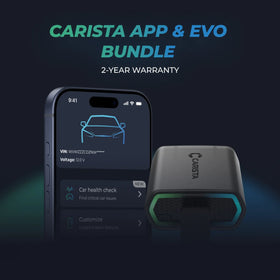
Carista EVO Bundle
Scanner €69,95 + €5,82/month for the app
Frequently Asked Questions
Is using the Carista app and scanner safe, and how is my vehicle data protected?
Yes, using the Carista App and Scanners is safe.
Our company, certified with TISAX, achieved TISAX level 2 certification in January 2024, ensuring the highest information security standards. Trusted Information Security Assessment Exchange (TISAX) is a collection of information security policies we adhere to. We strictly follow them, utilizing advanced encryption and security protocols to protect your vehicle data, ensuring it remains confidential and secure at all times.
By implementing security measures, Carista ensures that using our App and Scanners is not only convenient for vehicle customizations and diagnostics but also safe and secure for your personal data.TEst
Our company, certified with TISAX, achieved TISAX level 2 certification in January 2024, ensuring the highest information security standards. Trusted Information Security Assessment Exchange (TISAX) is a collection of information security policies we adhere to. We strictly follow them, utilizing advanced encryption and security protocols to protect your vehicle data, ensuring it remains confidential and secure at all times.
By implementing security measures, Carista ensures that using our App and Scanners is not only convenient for vehicle customizations and diagnostics but also safe and secure for your personal data.TEst
Does the Carista scanner include a warranty?
Yes, each Carista Scanner includes a 2-year warranty.
If you suspect the Scanner is faulty, double-check that it's securely plugged in, your car's ignition is on, and it's connected to the Carista App via Bluetooth. If the problem remains, find the gear icon at the bottom right of your Carista App screen and select "Report a problem." Our experts will help you troubleshoot or guide you through replacing the faulty scanner.
Does installing a Carista EVO scanner void my car's warranty?
Using an OBD-II (On-Board Diagnostics) scanner to monitor your vehicle's performance, diagnose issues, or gather data should not void your car's warranty. The OBD2 port is a standardized diagnostic interface that allows external devices to read information from the vehicle's computer system.
Our OBD Scanners are of high quality and are designed to work seamlessly with your vehicle’s computer system.
However, checking your vehicle’s warranty terms and conditions is important to see if using a particular OBD2 device or modification would impact your warranty coverage.
Our OBD Scanners are of high quality and are designed to work seamlessly with your vehicle’s computer system.
However, checking your vehicle’s warranty terms and conditions is important to see if using a particular OBD2 device or modification would impact your warranty coverage.
How do I connect the Carista EVO scanner?
Just plug the scanner into your car and start using the app. There’s no prior setup, pairing, or connecting necessary. Just make sure your phone/tablet’s Bluetooth is turned on. When the Carista app asks you what kind of scanner you’re using select Carista.

Monthly tips from 50,000+ Carista drivers
Hidden features, customization ideas & real owner guides — delivered to your inbox every month.

Used by 500,000+ drivers
The beginner's guide to car customization
10 features any driver can unlock in under 10 minutes — no technical knowledge needed