Your Audi A8 D3 is supported

54 features available

Change Selection

Audi A8

D3

Available features for your car
Search features

Customize

Unlock manufacturer-hidden features to boost security, upgrade your infotainment system, and personalize your drive.
41
最も人気のある設定 10
警告 1
インスツルメント:ディスプレイとナビゲーション 7
インスツルメント:言語と単位 1
ライト:デイタイムランニングライト(DRL) 1
ライト:エクステリア 3
ライト:インテリア 2
ロッキング:ビープ音と点滅 3
ロッキング:ドアとアラーム 1
パーキングセンサー 5
ウィンドウとサンルーフ 7

Diagnose

Diagnose dashboard warning lights for ABS, SRS, Engine, Transmission, TPMS, HVAC, and more, and clear fault codes instantly.
33
基本的なOBD2
CANネットワークゲートウェイ
エンジン
パーキングブレーキ
ステアリングホイール
エアバッグ
インストゥルメントクラスタ
インフォテインメントディスプレイ
ナビゲーション
ボイスコントロール
ラジオ
サウンドシステム
メディアプレイヤー
電話
イモビライザー
ヘッドライトエイミング
タイヤ圧力モニター
ヒーター&エアコン
パーキングセンサー
オートレベリングサスペンション
セントラルエレクトロニクス
セントラルエレクトロニクス2
ボディ/コンビニエンス システム
運転席ドア
助手席ドア
リア左側ドア
リア右側ドア
運転席
助手席
イグニッション許可
バッテリーレギュレーター
ルーフエレクトロニクス
アダプティブクルーズコントロール

Live Data

Stay informed with real-time data across the vehicle, including engine RPM, speed, fuel trims, oxygen (O2) sensor data, coolant/oil temperature, and more.
3
サービス間隔情報
車両走行距離情報
基本的なOBD2ライブデータ

Service

Manage service intervals, service/oil reset, TPMS reset, EPB reset, battery registration, DPF regeneration, and other service options on your own.
7
サービスインジケータのリセット
電動パーキングブレーキ点検
燃料システムプライム
スロットルボディの適合
詳細なECU情報
エミッションテスト
加速テスト

All available features

Customize

Unlock manufacturer-hidden features to boost security, upgrade your infotainment system, and personalize your drive.
41 features
最も人気のある設定 10
警告 1
インスツルメント:ディスプレイとナビゲーション 7
インスツルメント:言語と単位 1
ライト:デイタイムランニングライト(DRL) 1
ライト:エクステリア 3
ライト:インテリア 2
ロッキング:ビープ音と点滅 3
ロッキング:ドアとアラーム 1
パーキングセンサー 5
ウィンドウとサンルーフ 7
基本的なOBD2
CANネットワークゲートウェイ
エンジン
パーキングブレーキ
ステアリングホイール
エアバッグ
インストゥルメントクラスタ
インフォテインメントディスプレイ
ナビゲーション
ボイスコントロール
ラジオ
サウンドシステム
メディアプレイヤー
電話
イモビライザー
ヘッドライトエイミング
タイヤ圧力モニター
ヒーター&エアコン
パーキングセンサー
オートレベリングサスペンション
セントラルエレクトロニクス
セントラルエレクトロニクス2
ボディ/コンビニエンス システム
運転席ドア
助手席ドア
リア左側ドア
リア右側ドア
運転席
助手席
イグニッション許可
バッテリーレギュレーター
ルーフエレクトロニクス
アダプティブクルーズコントロール
サービス間隔情報
車両走行距離情報
基本的なOBD2ライブデータ
サービスインジケータのリセット
電動パーキングブレーキ点検
燃料システムプライム
スロットルボディの適合
詳細なECU情報
エミッションテスト
加速テスト

Not sure a feature will work on your specific Audi A8? Try Carista risk-free with our 30-day money-back guarantee.
Ready to take control of your Audi A8?

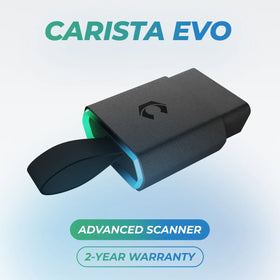
BestsellerCarista EVO Scanner

Carista EVO Bundle

Scanner €69,99 + €4,99/month for the app

Frequently Asked Questions

Is using the Carista app and scanner safe, and how is my vehicle data protected?
Yes, using the Carista App and Scanners is safe.

Our company, certified with TISAX, achieved TISAX level 2 certification in January 2024, ensuring the highest information security standards. Trusted Information Security Assessment Exchange (TISAX) is a collection of information security policies we adhere to. We strictly follow them, utilizing advanced encryption and security protocols to protect your vehicle data, ensuring it remains confidential and secure at all times.

By implementing security measures, Carista ensures that using our App and Scanners is not only convenient for vehicle customizations and diagnostics but also safe and secure for your personal data.TEst
Does the Carista scanner include a warranty?
Yes, each Carista Scanner includes a 2-year warranty.

If you suspect the Scanner is faulty, double-check that it's securely plugged in, your car's ignition is on, and it's connected to the Carista App via Bluetooth. If the problem remains, find the gear icon at the bottom right of your Carista App screen and select "Report a problem." Our experts will help you troubleshoot or guide you through replacing the faulty scanner.
Does installing a Carista EVO scanner void my car's warranty?
Using an OBD-II (On-Board Diagnostics) scanner to monitor your vehicle's performance, diagnose issues, or gather data should not void your car's warranty. The OBD2 port is a standardized diagnostic interface that allows external devices to read information from the vehicle's computer system.

Our OBD Scanners are of high quality and are designed to work seamlessly with your vehicle’s computer system.

However, checking your vehicle’s warranty terms and conditions is important to see if using a particular OBD2 device or modification would impact your warranty coverage.
How do I connect the Carista EVO scanner?
Just plug the scanner into your car and start using the app. There’s no prior setup, pairing, or connecting necessary. Just make sure your phone/tablet’s Bluetooth is turned on. When the Carista app asks you what kind of scanner you’re using select Carista.