


Tells you how many times each of your car's airbags have been deployed. Especially useful when buying used cars.
Din Volkswagen Tiguan Mk3 (MQB Evo) (SFD2) understøttes
30 funktioner tilgængelige
Din Volkswagen Tiguan Mk3 (MQB Evo) (SFD2) understøttes
30 funktioner tilgængelige
Tilpas
Lås op for producentens skjulte funktioner for at øge sikkerheden, opgradere dit infotainmentsystem og gøre din kørsel personlig. Ikke tilgængelig
Diagnosticér
Diagnosticér advarselslamper i instrumentbrættet for ABS, SRS, motor, transmission, TPMS, HVAC og meget mere, og ryd fejlkoder med det samme.18
Live data
Hold dig informeret med data i realtid fra hele bilen, herunder motorens omdrejningstal, hastighed, brændstoftrim, data fra ilt- (O2-)sensoren, kølevæske-/olietemperatur og meget mere.6
Service
Administrer serviceintervaller, nulstil service/olie, nulstil TPMS og EPB, registrer batteriet, regenerer DPF, og håndter andre servicemuligheder på egen hånd.6
Alle tilgængelige funktioner
Tilpas
Lås op for producentens skjulte funktioner for at øge sikkerheden, opgradere dit infotainmentsystem og gøre din kørsel personlig. Ikke tilgængelig
Diagnosticér
Diagnosticér advarselslamper i instrumentbrættet for ABS, SRS, motor, transmission, TPMS, HVAC og meget mere, og ryd fejlkoder med det samme.18 funktioner
Live data
Hold dig informeret med data i realtid fra hele bilen, herunder motorens omdrejningstal, hastighed, brændstoftrim, data fra ilt- (O2-)sensoren, kølevæske-/olietemperatur og meget mere.6 funktioner
Service
Administrer serviceintervaller, nulstil service/olie, nulstil TPMS og EPB, registrer batteriet, regenerer DPF, og håndter andre servicemuligheder på egen hånd.6 funktioner
Er du usikker på, om en funktion virker på netop din Volkswagen Tiguan? Prøv Carista risikofrit med vores 30-dages pengene-tilbage-garanti.
Klar til at tage kontrol over din Volkswagen Tiguan?
Bestseller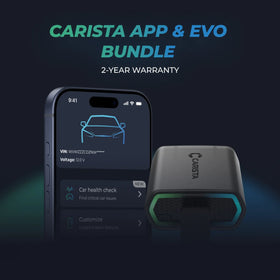
Carista Bundle: EVO + 12-Month PRO
Scanner £15.00 + £4.99/måned for appen
Klar til at tage kontrol over din Volkswagen Tiguan?
Bestseller
Carista Bundle: EVO + 12-Month PRO
Scanner £15.00 + £4.99/måned for appen
Ofte stillede spørgsmål
Is using the Carista app and scanner safe, and how is my vehicle data protected?
Yes, using the Carista App and Scanners is safe.
Our company, certified with TISAX, achieved TISAX level 2 certification in January 2024, ensuring the highest information security standards. Trusted Information Security Assessment Exchange (TISAX) is a collection of information security policies we adhere to. We strictly follow them, utilizing advanced encryption and security protocols to protect your vehicle data, ensuring it remains confidential and secure at all times.
By implementing security measures, Carista ensures that using our App and Scanners is not only convenient for vehicle customizations and diagnostics but also safe and secure for your personal data.TEst
Our company, certified with TISAX, achieved TISAX level 2 certification in January 2024, ensuring the highest information security standards. Trusted Information Security Assessment Exchange (TISAX) is a collection of information security policies we adhere to. We strictly follow them, utilizing advanced encryption and security protocols to protect your vehicle data, ensuring it remains confidential and secure at all times.
By implementing security measures, Carista ensures that using our App and Scanners is not only convenient for vehicle customizations and diagnostics but also safe and secure for your personal data.TEst
Does the Carista scanner include a warranty?
Yes, each Carista Scanner includes a 2-year warranty.
If you suspect the Scanner is faulty, double-check that it's securely plugged in, your car's ignition is on, and it's connected to the Carista App via Bluetooth. If the problem remains, find the gear icon at the bottom right of your Carista App screen and select "Report a problem." Our experts will help you troubleshoot or guide you through replacing the faulty scanner.
If you suspect the Scanner is faulty, double-check that it's securely plugged in, your car's ignition is on, and it's connected to the Carista App via Bluetooth. If the problem remains, find the gear icon at the bottom right of your Carista App screen and select "Report a problem." Our experts will help you troubleshoot or guide you through replacing the faulty scanner.
Does installing a Carista EVO scanner void my car's warranty?
Using an OBD-II (On-Board Diagnostics) scanner to monitor your vehicle's performance, diagnose issues, or gather data should not void your car's warranty. The OBD2 port is a standardized diagnostic interface that allows external devices to read information from the vehicle's computer system.
Our OBD Scanners are of high quality and are designed to work seamlessly with your vehicle’s computer system.
However, checking your vehicle’s warranty terms and conditions is important to see if using a particular OBD2 device or modification would impact your warranty coverage.
Our OBD Scanners are of high quality and are designed to work seamlessly with your vehicle’s computer system.
However, checking your vehicle’s warranty terms and conditions is important to see if using a particular OBD2 device or modification would impact your warranty coverage.
How do I connect the Carista EVO scanner?
Just plug the scanner into your car and start using the app. There’s no prior setup, pairing, or connecting necessary. Just make sure your phone/tablet’s Bluetooth is turned on. When the Carista app asks you what kind of scanner you’re using select Carista.
Ofte stillede spørgsmål
Is using the Carista app and scanner safe, and how is my vehicle data protected?
Yes, using the Carista App and Scanners is safe.
Our company, certified with TISAX, achieved TISAX level 2 certification in January 2024, ensuring the highest information security standards. Trusted Information Security Assessment Exchange (TISAX) is a collection of information security policies we adhere to. We strictly follow them, utilizing advanced encryption and security protocols to protect your vehicle data, ensuring it remains confidential and secure at all times.
By implementing security measures, Carista ensures that using our App and Scanners is not only convenient for vehicle customizations and diagnostics but also safe and secure for your personal data.TEst
Our company, certified with TISAX, achieved TISAX level 2 certification in January 2024, ensuring the highest information security standards. Trusted Information Security Assessment Exchange (TISAX) is a collection of information security policies we adhere to. We strictly follow them, utilizing advanced encryption and security protocols to protect your vehicle data, ensuring it remains confidential and secure at all times.
By implementing security measures, Carista ensures that using our App and Scanners is not only convenient for vehicle customizations and diagnostics but also safe and secure for your personal data.TEst
Does the Carista scanner include a warranty?
Yes, each Carista Scanner includes a 2-year warranty.
If you suspect the Scanner is faulty, double-check that it's securely plugged in, your car's ignition is on, and it's connected to the Carista App via Bluetooth. If the problem remains, find the gear icon at the bottom right of your Carista App screen and select "Report a problem." Our experts will help you troubleshoot or guide you through replacing the faulty scanner.
If you suspect the Scanner is faulty, double-check that it's securely plugged in, your car's ignition is on, and it's connected to the Carista App via Bluetooth. If the problem remains, find the gear icon at the bottom right of your Carista App screen and select "Report a problem." Our experts will help you troubleshoot or guide you through replacing the faulty scanner.
Does installing a Carista EVO scanner void my car's warranty?
Using an OBD-II (On-Board Diagnostics) scanner to monitor your vehicle's performance, diagnose issues, or gather data should not void your car's warranty. The OBD2 port is a standardized diagnostic interface that allows external devices to read information from the vehicle's computer system.
Our OBD Scanners are of high quality and are designed to work seamlessly with your vehicle’s computer system.
However, checking your vehicle’s warranty terms and conditions is important to see if using a particular OBD2 device or modification would impact your warranty coverage.
Our OBD Scanners are of high quality and are designed to work seamlessly with your vehicle’s computer system.
However, checking your vehicle’s warranty terms and conditions is important to see if using a particular OBD2 device or modification would impact your warranty coverage.
How do I connect the Carista EVO scanner?
Just plug the scanner into your car and start using the app. There’s no prior setup, pairing, or connecting necessary. Just make sure your phone/tablet’s Bluetooth is turned on. When the Carista app asks you what kind of scanner you’re using select Carista.


Bruges af over 500.000 bilister
Begynderguiden til biltilpasning
10 funktioner, som alle bilister kan aktivere på under 10 minutter - uden teknisk videneriwa