Vaše Audi Q8 1st gen je podporováno

143 dostupných funkcí

Změnit výběr

Audi Q8

1st gen

Vaše Audi Q8 1st gen je podporováno

143 dostupných funkcí

Změnit výběr
Dostupné funkce pro vaše auto
Funkce vyhledávání
Funkce vyhledávání

Přizpůsobit

Odemkněte výrobcem skryté funkce, zvýšte bezpečnost, vylepšete svůj infotainmentový systém a přizpůsobte si jízdu.
92
Most Popular 10
Chassis & Engine 2
Dings & Warnings 3
Driver Assist 6
Instruments: Displays & Nav 24
Instruments: Language & Units 2
Lights: Coming/Leaving Home 4
Lights: Daytime Running Lights (DRL) 5
Lights: Exterior 11
Lights: Interior 1
Locking: Automatic 2
Locking: Beep & Blink 4
Mirrors 1
Parking Sensors 3
Seats & Steering Wheel 4
Trunk 2
Windows & Sunroof 5
Wipers & Washer 1
Other 2

Diagnostikovat

Diagnostikujte výstražné kontrolky na palubní desce pro ABS, SRS, motor, převodovku, TPMS, HVAC a další systémy a okamžitě vymažte chybové kódy.
24
Basic OBD2
CAN network gateway
Engine
Transmission
ABS
Power steering
Steering wheel
Airbags
Instrument cluster
Infotainment system
Auxiliary heater
Central electronics
Body/convenience system
Driver's door
Front passenger's door
Trunk
Driver's seat
Front passenger's seat
Driver assist front sensor
Rear axle steering
Gear selector switch
Hybrid battery
Reductant control
DC/DC converter

Živá data

Mějte přehled o datech z celého vozidla v reálném čase, včetně otáček motoru, rychlosti, korekcí paliva, údajů ze senzoru kyslíku (O2), teploty chladicí kapaliny/oleje a dalších údajů.
11
Transmission live data
Airbag crashes count report
Service interval info
Car battery info
Engine turbo live data
Engine data
Diesel Exhaust Fluid (DEF) level
Diesel Particulate Filter (DPF) info
Vehicle mileage information
Fuel injection system info
Basic OBD2 live data

Servis

Spravujte servisní intervaly, resetujte servisní intervaly/olej, systém TPMS a EPB, registrujte baterii, regenerujte DPF a provádějte další servisní úkony sami.
16
Used car checks
Video in Motion
MirrorLink in Motion
Service indicator reset
Electronic parking brake service
Diesel Particulate Filter (DPF) regeneration
Battery registration
Throttle body adaptation
Fuel system prime
Auxiliary heater unlock
TPMS reset
Instrument cluster colors test
Instrument cluster gong test
Detailed ECU info
Emission tests
Acceleration test

Všechny dostupné funkce

Přizpůsobit

Odemkněte výrobcem skryté funkce, zvýšte bezpečnost, vylepšete svůj infotainmentový systém a přizpůsobte si jízdu.
92 funkcí
Most Popular 10
Chassis & Engine 2
Dings & Warnings 3
Driver Assist 6
Instruments: Displays & Nav 24
Instruments: Language & Units 2
Lights: Coming/Leaving Home 4
Lights: Daytime Running Lights (DRL) 5
Lights: Exterior 11
Lights: Interior 1
Locking: Automatic 2
Locking: Beep & Blink 4
Mirrors 1
Parking Sensors 3
Seats & Steering Wheel 4
Trunk 2
Windows & Sunroof 5
Wipers & Washer 1
Other 2
Basic OBD2
CAN network gateway
Engine
Transmission
ABS
Power steering
Steering wheel
Airbags
Instrument cluster
Infotainment system
Auxiliary heater
Central electronics
Body/convenience system
Driver's door
Front passenger's door
Trunk
Driver's seat
Front passenger's seat
Driver assist front sensor
Rear axle steering
Gear selector switch
Hybrid battery
Reductant control
DC/DC converter
Transmission live data
Airbag crashes count report
Service interval info
Car battery info
Engine turbo live data
Engine data
Diesel Exhaust Fluid (DEF) level
Diesel Particulate Filter (DPF) info
Vehicle mileage information
Fuel injection system info
Basic OBD2 live data
Used car checks
Video in Motion
MirrorLink in Motion
Service indicator reset
Electronic parking brake service
Diesel Particulate Filter (DPF) regeneration
Battery registration
Throttle body adaptation
Fuel system prime
Auxiliary heater unlock
TPMS reset
Instrument cluster colors test
Instrument cluster gong test
Detailed ECU info
Emission tests
Acceleration test

Nejste si jistí, zda bude funkce fungovat na vašem konkrétním voze Audi Q8? Vyzkoušejte Carista bez rizika s naší 30denní zárukou vrácení peněz.

Audi Q8 (1st gen)

143+ funkcí

Jste připraveni převzít kontrolu nad vozem Audi Q8?

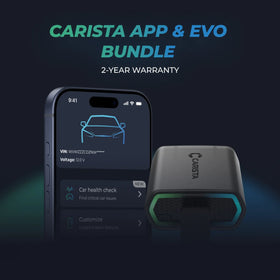
Nejoblíbenější sklademCarista Bundle: EVO + 12-Month PRO

Carista Bundle: EVO + 12-Month PRO

Skener £15.00 + £4.99/měsíc za aplikaci

Jste připraveni převzít kontrolu nad vozem Audi Q8?

Nejoblíbenější sklademCarista Bundle: EVO + 12-Month PRO

Carista Bundle: EVO + 12-Month PRO

Skener £15.00 + £4.99/měsíc za aplikaci

Často kladené dotazy

Is using the Carista app and scanner safe, and how is my vehicle data protected?
Yes, using the Carista App and Scanners is safe.

Our company, certified with TISAX, achieved TISAX level 2 certification in January 2024, ensuring the highest information security standards. Trusted Information Security Assessment Exchange (TISAX) is a collection of information security policies we adhere to. We strictly follow them, utilizing advanced encryption and security protocols to protect your vehicle data, ensuring it remains confidential and secure at all times.

By implementing security measures, Carista ensures that using our App and Scanners is not only convenient for vehicle customizations and diagnostics but also safe and secure for your personal data.TEst
Does the Carista scanner include a warranty?
Yes, each Carista Scanner includes a 2-year warranty.

If you suspect the Scanner is faulty, double-check that it's securely plugged in, your car's ignition is on, and it's connected to the Carista App via Bluetooth. If the problem remains, find the gear icon at the bottom right of your Carista App screen and select "Report a problem." Our experts will help you troubleshoot or guide you through replacing the faulty scanner.
Does installing a Carista EVO scanner void my car's warranty?
Using an OBD-II (On-Board Diagnostics) scanner to monitor your vehicle's performance, diagnose issues, or gather data should not void your car's warranty. The OBD2 port is a standardized diagnostic interface that allows external devices to read information from the vehicle's computer system.

Our OBD Scanners are of high quality and are designed to work seamlessly with your vehicle’s computer system.

However, checking your vehicle’s warranty terms and conditions is important to see if using a particular OBD2 device or modification would impact your warranty coverage.
How do I connect the Carista EVO scanner?
Just plug the scanner into your car and start using the app. There’s no prior setup, pairing, or connecting necessary. Just make sure your phone/tablet’s Bluetooth is turned on. When the Carista app asks you what kind of scanner you’re using select Carista.
Zobrazit všechny často kladené dotazy

Často kladené dotazy

Is using the Carista app and scanner safe, and how is my vehicle data protected?
Yes, using the Carista App and Scanners is safe.

Our company, certified with TISAX, achieved TISAX level 2 certification in January 2024, ensuring the highest information security standards. Trusted Information Security Assessment Exchange (TISAX) is a collection of information security policies we adhere to. We strictly follow them, utilizing advanced encryption and security protocols to protect your vehicle data, ensuring it remains confidential and secure at all times.

By implementing security measures, Carista ensures that using our App and Scanners is not only convenient for vehicle customizations and diagnostics but also safe and secure for your personal data.TEst
Does the Carista scanner include a warranty?
Yes, each Carista Scanner includes a 2-year warranty.

If you suspect the Scanner is faulty, double-check that it's securely plugged in, your car's ignition is on, and it's connected to the Carista App via Bluetooth. If the problem remains, find the gear icon at the bottom right of your Carista App screen and select "Report a problem." Our experts will help you troubleshoot or guide you through replacing the faulty scanner.
Does installing a Carista EVO scanner void my car's warranty?
Using an OBD-II (On-Board Diagnostics) scanner to monitor your vehicle's performance, diagnose issues, or gather data should not void your car's warranty. The OBD2 port is a standardized diagnostic interface that allows external devices to read information from the vehicle's computer system.

Our OBD Scanners are of high quality and are designed to work seamlessly with your vehicle’s computer system.

However, checking your vehicle’s warranty terms and conditions is important to see if using a particular OBD2 device or modification would impact your warranty coverage.
How do I connect the Carista EVO scanner?
Just plug the scanner into your car and start using the app. There’s no prior setup, pairing, or connecting necessary. Just make sure your phone/tablet’s Bluetooth is turned on. When the Carista app asks you what kind of scanner you’re using select Carista.
Zobrazit všechny často kladené dotazy