Your Nissan Note e-Power 1st gen (E12) is supported

41 features available

Change Selection

Nissan Note e-Power

1st gen (E12)

Available features for your car
Search features

Customize

Unlock manufacturer-hidden features to boost security, upgrade your infotainment system, and personalize your drive.
36
Die beliebtesten 6
Chassis und Motor 1
Klingeltöne und Warnungen 3
Lichter: Automatische 2
Lichter: Tagfahrlicht 2
Lichter: Außenbeleuchtung 1
Lichter: Innenbeleuchtung 3
Verriegeln: Automatisch 3
Verriegeln: Piep und Blinken 5
Verriegeln: Türen und Alarmsignal 2
Verriegelung: Smart Key 2
Spiegel 1
Parksensoren 1
Kofferraum 1
Scheibenwischer und Waschanlage 3

Diagnose

Diagnose dashboard warning lights for ABS, SRS, Engine, Transmission, TPMS, HVAC, and more, and clear fault codes instantly.
21
Basis OBD2
Motor
Aufbau-/Komfortsystem
Airbags
ABS
Sonar
Intelligentes Leistungsverteilungsmodul im Motorraum (IPDM E/R)
Abstandsregeltempomat
Heizung und Klimatisierung
Rundumsicht-Kamera
Aktivlenkung (DAST3)
Spurhalteassistent
Kombi-Instrument
Fahrzeugsteuermodul
Telematik
Hybridbatterie
Motorsteuerung für Elektrofahrzeuge
Getriebesteuergerät
Fahrzeugstabilitätskontrolle
Generatorkontrollmodul
Scheinwerfereinstellung

Live Data

Stay informed with real-time data across the vehicle, including engine RPM, speed, fuel trims, oxygen (O2) sensor data, coolant/oil temperature, and more.
2
Live-Daten zum HLK-System
Grundlegende OBD2-Live-Daten

Service

Manage service intervals, service/oil reset, TPMS reset, EPB reset, battery registration, DPF regeneration, and other service options on your own.
3
Detaillierte ECU-Info
Abgastests
Beschleunigungstest

All available features

Customize

Unlock manufacturer-hidden features to boost security, upgrade your infotainment system, and personalize your drive.
36 features
Die beliebtesten 6
Chassis und Motor 1
Klingeltöne und Warnungen 3
Lichter: Automatische 2
Lichter: Tagfahrlicht 2
Lichter: Außenbeleuchtung 1
Lichter: Innenbeleuchtung 3
Verriegeln: Automatisch 3
Verriegeln: Piep und Blinken 5
Verriegeln: Türen und Alarmsignal 2
Verriegelung: Smart Key 2
Spiegel 1
Parksensoren 1
Kofferraum 1
Scheibenwischer und Waschanlage 3
Basis OBD2
Motor
Aufbau-/Komfortsystem
Airbags
ABS
Sonar
Intelligentes Leistungsverteilungsmodul im Motorraum (IPDM E/R)
Abstandsregeltempomat
Heizung und Klimatisierung
Rundumsicht-Kamera
Aktivlenkung (DAST3)
Spurhalteassistent
Kombi-Instrument
Fahrzeugsteuermodul
Telematik
Hybridbatterie
Motorsteuerung für Elektrofahrzeuge
Getriebesteuergerät
Fahrzeugstabilitätskontrolle
Generatorkontrollmodul
Scheinwerfereinstellung
Live-Daten zum HLK-System
Grundlegende OBD2-Live-Daten
Detaillierte ECU-Info
Abgastests
Beschleunigungstest

Not sure a feature will work on your specific Nissan Note e-Power? Try Carista risk-free with our 30-day money-back guarantee.

Ready to take control of your Nissan Note e-Power?

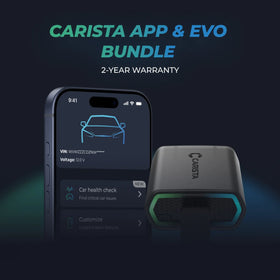
BestsellerImage of the advanced Carista EVO Bluetooth OBDII scanner

Carista EVO Bundle

Scanner £34.99 + £4.99/month for the app

Frequently Asked Questions

Is using the Carista app and scanner safe, and how is my vehicle data protected?
Yes, using the Carista App and Scanners is safe.

Our company, certified with TISAX, achieved TISAX level 2 certification in January 2024, ensuring the highest information security standards. Trusted Information Security Assessment Exchange (TISAX) is a collection of information security policies we adhere to. We strictly follow them, utilizing advanced encryption and security protocols to protect your vehicle data, ensuring it remains confidential and secure at all times.

By implementing security measures, Carista ensures that using our App and Scanners is not only convenient for vehicle customizations and diagnostics but also safe and secure for your personal data.TEst
Does the Carista scanner include a warranty?
Yes, each Carista Scanner includes a 2-year warranty.

If you suspect the Scanner is faulty, double-check that it's securely plugged in, your car's ignition is on, and it's connected to the Carista App via Bluetooth. If the problem remains, find the gear icon at the bottom right of your Carista App screen and select "Report a problem." Our experts will help you troubleshoot or guide you through replacing the faulty scanner.
Does installing a Carista EVO scanner void my car's warranty?
Using an OBD-II (On-Board Diagnostics) scanner to monitor your vehicle's performance, diagnose issues, or gather data should not void your car's warranty. The OBD2 port is a standardized diagnostic interface that allows external devices to read information from the vehicle's computer system.

Our OBD Scanners are of high quality and are designed to work seamlessly with your vehicle’s computer system.

However, checking your vehicle’s warranty terms and conditions is important to see if using a particular OBD2 device or modification would impact your warranty coverage.
How do I connect the Carista EVO scanner?
Just plug the scanner into your car and start using the app. There’s no prior setup, pairing, or connecting necessary. Just make sure your phone/tablet’s Bluetooth is turned on. When the Carista app asks you what kind of scanner you’re using select Carista.