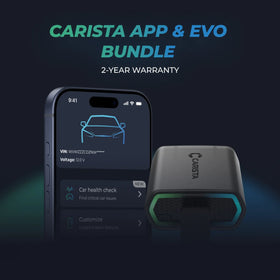
Your BMW 3-series & M3 F30/F31/F34/F35/F80 with CIC is supported
48 features available
What BMW 3-series & M3 owners customize most
- PopularLeaving-home lights duration
- PopularShow digital speed in dashboard (BC)
- PopularAuto headlights activation threshold
- PopularAuto start/stop: remember last state
- PopularDaytime running lights (DRL) use…
Search features
Customize
Unlock manufacturer-hidden features to boost security, upgrade your infotainment system, and personalize your drive.80
Most Popular 5
Chassis & Engine 3
Instruments: Displays & Nav 20
Lights: Automatic 1
Lights: Coming/Leaving Home 33
Lights: Daytime Running Lights (DRL) 1
Lights: Exterior 1
Locking: Beep & Blink 2
Mirrors 2
Parking Sensors 5
Windows & Sunroof 7
80
Show more Show less
Diagnose
Diagnose dashboard warning lights for ABS, SRS, Engine, Transmission, TPMS, HVAC, and more, and clear fault codes instantly.23
Basic OBD2
Engine
Transmission
Fuel pump
Heater & air conditioning
Traction/stability control
Airbags
Instrument cluster
Dynamic management
Power steering
Front electronics module (FEM)
Central electronics
Rear electronics module (REM)
Center roof module
Driver's seat
Audio amplifier
Infotainment system
Telephone
Flexible bus interface
CAN network gateway
All-round vision camera
Gear selector switch
Treble bass extender (TBX)
23
Show more Show less
Live Data
Stay informed with real-time data across the vehicle, including engine RPM, speed, fuel trims, oxygen (O2) sensor data, coolant/oil temperature, and more.7
Transmission live data
Car battery info
Engine turbo live data
Engine data
Diesel Particulate Filter (DPF) info
Vehicle mileage information
Basic OBD2 live data
7
Show more Show less
Service
Manage service intervals, service/oil reset, TPMS reset, EPB reset, battery registration, DPF regeneration, and other service options on your own.7
Diesel Particulate Filter (DPF) regeneration
Service indicator reset
Video in Motion
Battery registration
Detailed ECU info
Emission tests
Acceleration test
7
Show more Show less
All available features
Customize
Unlock manufacturer-hidden features to boost security, upgrade your infotainment system, and personalize your drive.80
Most Popular 5
Chassis & Engine 3
Instruments: Displays & Nav 20
Lights: Automatic 1
Lights: Coming/Leaving Home 33
Lights: Daytime Running Lights (DRL) 1
Lights: Exterior 1
Locking: Beep & Blink 2
Mirrors 2
Parking Sensors 5
Windows & Sunroof 7
Diagnose
Diagnose dashboard warning lights for ABS, SRS, Engine, Transmission, TPMS, HVAC, and more, and clear fault codes instantly.23
Basic OBD2
Engine
Transmission
Fuel pump
Heater & air conditioning
Traction/stability control
Airbags
Instrument cluster
Dynamic management
Power steering
Front electronics module (FEM)
Central electronics
Rear electronics module (REM)
Center roof module
Driver's seat
Audio amplifier
Infotainment system
Telephone
Flexible bus interface
CAN network gateway
All-round vision camera
Gear selector switch
Treble bass extender (TBX)
Live Data
Stay informed with real-time data across the vehicle, including engine RPM, speed, fuel trims, oxygen (O2) sensor data, coolant/oil temperature, and more.7
Transmission live data
Car battery info
Engine turbo live data
Engine data
Diesel Particulate Filter (DPF) info
Vehicle mileage information
Basic OBD2 live data
Service
Manage service intervals, service/oil reset, TPMS reset, EPB reset, battery registration, DPF regeneration, and other service options on your own.7
Diesel Particulate Filter (DPF) regeneration
Service indicator reset
Video in Motion
Battery registration
Detailed ECU info
Emission tests
Acceleration test
Not sure a feature will work on your specific BMW 3-series & M3? Try Carista risk-free with our 30-day money-back guarantee.
Most Popular
Leaving-home lights duration
Show digital speed in dashboard (BC)
This customization may trigger warning lights to appear on your dashboard. If so, diagnose your car using the "Diagnose" menu, reset the DTCs, and turn the ignition OFF and ON.
Auto headlights activation threshold
Auto start/stop: remember last state
Daytime running lights (DRL) use…
When choosing daytime running lights (DRL) ON with parking lights, make sure to verify the effect by checking the correct lights, as parking lights differ between vehicles.
Chassis & Engine
Auto start/stop system default when ignition turned on
On
Off
Auto start/stop: remember last state
Yes
No
Activate auto start/stop system automatically in ECO mode
Yes
No
Instruments: Displays & Nav
Show digital speed in dashboard (BC)
Yes
No
This customization may trigger warning lights to appear on your dashboard. If so, diagnose your car using the "Diagnose" menu, reset the DTCs, and turn the ignition OFF and ON.
Video from USB (step 1)
Yes
No (variant 1)
No (variant 2)
No (variant 3)
Video from USB (step 2)
Yes
No
Show torque and horsepower readings while driving
Enabled
Disabled
Torque and horsepower display units in multimedia menu
On
Off
Sport display must be active and the vehicle must be equipped with the Navigation system Professional.
Analog speed display
Yes
No
Disable iDrive legal disclaimer on start-up (“press accept” message)
Yes
Show with timeout
No
Disable rear-view camera legal disclaimer
Yes
Show with timeout
No
Disable night vision camera legal disclaimer
Yes
Show with timeout
No
Display gear shift suggestions (Economy)
Yes
No
Show individual tire temperature and pressure in TPMS menu
Yes
No
Navigation fuel stop suggestion
Enabled
Disabled
Position in navigation menu
Enabled
Disabled
Navigation arrow view in main menu
Enabled
Disabled
Show date in dashboard
Yes
No
Warn about low fuel level when range is…
Auto-set clock (via GPS)
Yes
No
Display cruise control speed for…
Include empty item when iterating over displays under speedometer
Yes
No
Shown message length while driving
0
1
2
3
4
5
6
7
Lights: Automatic
Auto headlights activation threshold
Very sensitive
Sensitive
Normal
Insensitive
Lights: Coming/Leaving Home
Extend coming-home lights flashing the high beams
Yes
No
Leaving-home lights
Yes
No
Ambient light threshold for leaving-home lights
Leaving-home lights brightness
Leaving-home lights duration
Use daytime running lights (left) as leaving-home lights
Yes, turn on immediately
Yes, turn on gradually
No
Use daytime running lights (right) as leaving-home lights
Yes, turn on immediately
Yes, turn on gradually
No
Use high beams (left) as leaving-home lights
Yes, turn on immediately
Yes, turn on gradually
No
Use high beams (right) as leaving-home lights
Yes, turn on immediately
Yes, turn on gradually
No
Use low beams (left) as leaving-home lights
Yes, turn on immediately
Yes, turn on gradually
No
Use low beams (right) as leaving-home lights
Yes, turn on immediately
Yes, turn on gradually
No
Use front marker lights (left) as leaving-home lights
Yes, turn on immediately
Yes, turn on gradually
No
Use front marker lights (right) as leaving-home lights
Yes, turn on immediately
Yes, turn on gradually
No
Use front turn signals (left) as leaving-home lights
Yes, turn on immediately
Yes, turn on gradually
No
Use front turn signals (right) as leaving-home lights
Yes, turn on immediately
Yes, turn on gradually
No
Use mirror turn signals (left) as leaving-home lights
Yes, turn on immediately
Yes, turn on gradually
No
Use mirror turn signals (right) as leaving-home lights
Yes, turn on immediately
Yes, turn on gradually
No
Use design lights (left) as leaving-home lights
Yes, turn on immediately
Yes, turn on gradually
No
Use design lights (right) as leaving-home lights
Yes, turn on immediately
Yes, turn on gradually
No
Use front fog lights (left) as leaving-home lights
Yes, turn on immediately
Yes, turn on gradually
No
Use front fog lights (right) as leaving-home lights
Yes, turn on immediately
Yes, turn on gradually
No
Use rear turn signals (left) as leaving-home lights
Yes, turn on immediately
Yes, turn on gradually
No
Use rear turn signals (right) as leaving-home lights
Yes, turn on immediately
Yes, turn on gradually
No
Use standing lights (1) (left) as leaving-home lights
Yes, turn on immediately
Yes, turn on gradually
No
Use standing lights (1) (right) as leaving-home lights
Yes, turn on immediately
Yes, turn on gradually
No
Use reversing lights (left) as leaving-home lights
Yes, turn on immediately
Yes, turn on gradually
No
Use reversing lights (right) as leaving-home lights
Yes, turn on immediately
Yes, turn on gradually
No
Use rear fog lights (left) as leaving-home lights
Yes, turn on immediately
Yes, turn on gradually
No
Use rear fog lights (right) as leaving-home lights
Yes, turn on immediately
Yes, turn on gradually
No
Use brake lights (left) as leaving-home lights
Yes, turn on immediately
Yes, turn on gradually
No
Use brake lights (right) as leaving-home lights
Yes, turn on immediately
Yes, turn on gradually
No
Use brake lights (middle) as leaving-home lights
Yes, turn on immediately
Yes, turn on gradually
No
Use license plate lights as leaving-home lights
Yes, turn on immediately
Yes, turn on gradually
No
Lights: Daytime Running Lights (DRL)
Daytime running lights (DRL) use…
On
On with parking lights
Off
When choosing daytime running lights (DRL) ON with parking lights, make sure to verify the effect by checking the correct lights, as parking lights differ between vehicles.
Lights: Exterior
Turn on puddle lights when in reverse (R)
Yes
No
Locking: Beep & Blink
Blink turn signals when locking doors
Off
1 flash
2 flashes
3 flashes
Blink turn signals when unlocking doors
Off
1 flash
2 flashes
3 flashes
Mirrors
Auto unfold side-view mirrors above…
Maximum speed at which side-view mirrors can be folded
Parking Sensors
Park Distance Control (PDC) in reverse
Enabled
Disabled
Distance after which to turn off top-view camera
Distance after which to turn off rear-view camera
Speed at which to turn off top-view camera
Speed at which to turn off rear-view camera
Windows & Sunroof
Allow 1-touch window operation after ignition is turned off
Yes
No
Close windows and sunroof via long-press on door handle sensor
Yes
No
Close windows and sunroof via long-press on remote
On
Only closing
Only opening
Off
Delay when closing windows/sunroof/mirrors via remote or door handle sensor
Delay when opening rear windows via remote
Delay when opening sunroof via remote
Delay when closing sunroof via remote or door handle sensor
Transmission live data
Get useful information in regards to your automatic transmission’s fluid (ATF): temperature, pressure, etc.
Car battery info
Allows you to troubleshoot issues with your car's charging electronics: alternator load, 12V battery voltage, 12V battery charge level, etc.
Engine turbo live data
Gets you important information about how your engine's turbine is behaving: current engine torque figure, intake manifold pressure, etc.
Engine data
Reads useful information about how your engine is running: RPMs, coolant temperature, fuel consumption, you name it!
Diesel Particulate Filter (DPF) info
Displays handy information about the time of the last DPF regeneration, as well as the distance driven since then, allowing you to catch potential problems early on.
Vehicle mileage information
Shows odometer readings from multiple modules in your car allowing you to see if the car's instrument cluster odometer has been fraudulently rolled back.
Basic OBD2 live data
Provides useful information about real-time parameters related to your Engine and Transmission ECUs.
Diesel Particulate Filter (DPF) regeneration
Force regeneration of your Diesel Particulate Filter (DPF).
Service indicator reset
Use this tool to reset the following indicators: • Oil • Front brake pads • Rear brake pads • Service brake fluid • Vehicle check
Video in Motion
Unlock this feature so passengers can watch videos on the multimedia system while the car is in motion. This tool is available only for vehicles that can play a video when the car is stationary and are fitted with the CIC infotainment system.
Battery registration
Register a new car battery with the vehicle's electronics - needed when you install a new battery.
Detailed ECU info
Detailed information about your car’s electronic control units (ECUs) including the part number, version and more.
Emission tests
Check if your car is ready for emission tests.
Acceleration test
Effortlessly measure your car's acceleration performance. This smart tool starts timing as soon as you move and delivers instant results as you hit each target speed. Designed for use in safe, controlled environments only.
Ready to take control of your BMW 3-series & M3?
Bestseller

Carista EVO Bundle
Scanner £49.99 + £4.99/month for the app
Frequently Asked Questions
Test
TEst

Monthly tips from 50,000+ Carista drivers
Hidden features, customization ideas & real owner guides — delivered to your inbox every month.

Used by 500,000+ drivers
The beginner's guide to car customization
10 features any driver can unlock in under 10 minutes — no technical knowledge needed